• Home
  • DMCA
  • Contact Us
  • Advertise
Subscribe On Telegram
Chat With Us
Request Anything
Wednesday, September 30, 2026
VFXDownload.Net
  • After Effects
    • After Effects Project
    • Audio Spectrum
    • Title
    • Elements
    • Openers
    • Promo
    • Video Displays
    • Music Visualizer
    • Logo Opener/String/Intro
  • Premiere Pro
    • Premiere Pro Logo
    • MOGRT
    • Premiere Pro Project
    • Title
  • Graphics & Arts
  • Sounds
  • Courses
  • Plugins & Scripts
No Result
View All Result
VFXDownload.Net
  • After Effects
    • After Effects Project
    • Audio Spectrum
    • Title
    • Elements
    • Openers
    • Promo
    • Video Displays
    • Music Visualizer
    • Logo Opener/String/Intro
  • Premiere Pro
    • Premiere Pro Logo
    • MOGRT
    • Premiere Pro Project
    • Title
  • Graphics & Arts
  • Sounds
  • Courses
  • Plugins & Scripts
No Result
View All Result
VFXDownload.Net
No Result
View All Result
Home After Effects

VideoHive Vintage Film Frame Overlays Pack-Retro Analog Border FX 64842199

September 30, 2026
in After Effects, Elements
0
VideoHive Vintage Film Frame Overlays Pack-Retro Analog Border FX 64842199
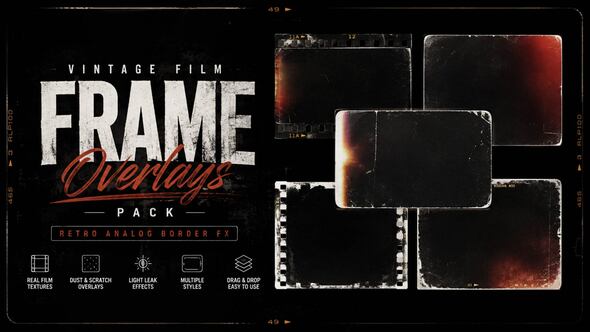
Vintage Film Frame Overlays Pack delivers 9 high-quality 4K overlays with analog borders, aged edges, dust, scratches, and light leaks for fast retro cinematic looks in any editor.

Free Download Vintage Film Frame Overlays Pack-Retro Analog Border FX. Real vintage texture rarely comes cheap, but it can come fast.

This pack from Power_FX_Studios hands you 9 overlays in 4K with film borders, aged edges, dust, scratches, and light leaks. Drop one above your footage in After Effects or any major editor, no plugins needed.

PNG and video files ship inside, so the retro look lands in a few clicks.

Overview of Vintage Film Frame Overlays Pack-Retro Analog Border FX

Vintage Film Frame Overlays Pack gives editors 9 4K overlay effects that add vintage film borders, analog frame textures, aged edges, dust, scratches, and light leaks to any clip.
Built by Power_FX_Studios, the set ships in PNG and video formats, with transparent alpha PNG versions included. Drop one above your footage, adjust it to your scene, and you get a realistic retro film look in a few clicks.
It fits travel videos, slideshows, wedding films, music videos, promos, commercials, and nostalgic storytelling projects. No plugins required, and the overlays work with major video editing software. Only the 9 overlay effects come in the download, so preview music, titles, and logos are not included.

Features of Vintage Film Frame Overlays Pack-Retro Analog Border FX

  • 9 vintage film frame overlays in 4K resolution.
  • Delivered as PNG files and video files, plus transparent alpha PNG versions.
  • Retro analog border effects with aged edges, dust, scratches, and light leaks.
  • Authentic retro cinematic look that layers over your footage in After Effects or any major video editor.
  • Drag and drop placement. No plugins required.
  • Adjust the overlay to your scene in a few clicks for a realistic vintage film feel.
  • Works with major video editing software.
  • Only the 9 overlay effects are included. Preview videos, photos, music, text, titles, logos, and other visual elements are not part of the download.

How to use Vintage Film Frame Overlays Pack-Retro Analog Border FX

  • Open After Effects and load the Vintage Film Frame Overlays Pack-Retro Analog Border FX template file.
  • Locate the composition that contains the overlay and border elements. Open it from the Project panel.
  • Import your footage into the same project. Add it to a new composition or the template composition.
  • Place the overlay layer above your footage on the timeline. Align its start and end with your clip.
  • Trim, move, or scale the overlay layer so the frame fits your shot.
  • Use the template controls to adjust the look. Keep the border clear and readable.
  • Preview the composition. Make small changes to timing, position, or strength as needed.
  • Check the result before exporting.
  • Render and export your finished video from After Effects when done.

Download More For Free :

  • Premiere Pro Templates
  • After Effects project
  • Apple Motion Templates
  • Graphics & Vector Art
  • Free Sound Effects
  • Plugin & Script

Vintage Film Frame Overlays Pack-Retro Analog Border FX Demo and Download

To download the Vintage Film Frame Overlays Pack-Retro Analog Border FX, open vfxdownload.net and scroll to the download section. Click the download button. This After Effects template by Power_FX_Studios includes 9 high-quality 4K overlays with vintage film borders, dust, scratches, and light leaks. The pack also adds aged edges and retro cinematic looks for nostalgic edits. Use them over travel videos, slideshows, or wedding films.

https://s3.envato.com/h264-video-previews/b9936538-b8f8-44f9-8be5-681d19189b8f/64842199.mp4

VideoHive – Vintage Film Frame Overlays Pack-Retro Analog Border FX | Size: 246.01 MB

HOW TO DOWNLOAD INFORMATION

Premium Fast-Speed Links

Fast Prefiles  NitroFlare  Turbobit  RapidGator

Free Slow-Speed Links

File-Up  Usersdrive

Disclaimer

This disclaimer relates to the Vintage Film Frame Overlays Pack-Retro Analog Border FX template by VideoHive. The demo content is provided for educational purposes only. You may not use it commercially without a valid purchase from vfxdownload.net. All rights remain with their respective owners. Check current licensing terms before any commercial project.


Join @vfxdownloadnet on Telegram
Tags: 4kagedalphaanalogAperturearchiveauthenticborderBurnCelluloidCinemaCinematicclassicdamageddistresseddocumentarydustedgeemulsionfadedfilmstripflickerfootageFrameGATEgraingrungeleakLightMemoryMovienostalgicoldschoolorganicoverlaypatinapngprojectorreelRetroroughscratchessepiaSlideshowtexturetimelesstransitiontransparentVideohive Vintage Film Frame Overlays Pack-Retro Analog Border FXVideohive Vintage Film Frame Overlays Pack-Retro Analog Border FX 64842199Videohive Vintage Film Frame Overlays Pack-Retro Analog Border FX 64842199 Free DownloadVideohive Vintage Film Frame Overlays Pack-Retro Analog Border FX Free DownloadVintageVintage Film Frame Overlays Pack-Retro Analog Border FXVintage Film Frame Overlays Pack-Retro Analog Border FX 64842199Vintage Film Frame Overlays Pack-Retro Analog Border FX downloadVintage Film Frame Overlays Pack-Retro Analog Border FX for After Effectsworn

Related Posts

VideoHive Vertical Light Leaks Transitions 64858004
After Effects

VideoHive Vertical Light Leaks Transitions 64858004

September 30, 2026
VideoHive Stylish Logo 64941428
After Effects

VideoHive Stylish Logo 64941428

September 30, 2026
VideoHive Slideshow Opener 64847498
After Effects

VideoHive Slideshow Opener 64847498

September 30, 2026
VideoHive Slideshow 64874746
After Effects

VideoHive Slideshow 64874746

September 30, 2026
VideoHive Logo Animated 64842929
After Effects

VideoHive Logo Animated 64842929

September 30, 2026
VideoHive Editorial Text 64847484
After Effects

VideoHive Editorial Text 64847484

September 30, 2026
0 0 votes
Article Rating
Subscribe
Notify of

This site uses Akismet to reduce spam. Learn how your comment data is processed.

0 Comments
Oldest
Newest Most Voted

Categories

Subscribe VFX

Join Chat Group

VFX Request Bots

Most Popular Packs!!!

How To Download Files

Free Download!!!!!!


Facebook Telegram

Pages

  • Advertise
  • Contact Us
  • DMCA
  • How To Download
  • Privacy Policy
  • Search
  • VFXDownload.Net

Top Categories

  • After Effects
  • Adobe Premiere Pro
  • Free Course
  • Motion Graphics
  • Exclusive
  • Google Drive Courses/Packs
  • Plugin & Script

Copyright © 2020-2025 VFXDownload.Net

No Result
View All Result
  • After Effects
    • After Effects Project
    • Audio Spectrum
    • Title
    • Elements
    • Openers
    • Promo
    • Video Displays
    • Music Visualizer
    • Logo Opener/String/Intro
  • Premiere Pro
    • Premiere Pro Logo
    • MOGRT
    • Premiere Pro Project
    • Title
  • Graphics & Arts
  • Sounds
  • Courses
  • Plugins & Scripts

Copyright © 2020-2025 VFXDownload.Net

wpDiscuz
0
0
Would love your thoughts, please comment.x
()
x
| Reply