• Home
  • DMCA
  • Contact Us
  • Advertise
Subscribe On Telegram
Chat With Us
Request Anything
Wednesday, November 25, 2026
VFXDownload.Net
  • After Effects
    • After Effects Project
    • Audio Spectrum
    • Title
    • Elements
    • Openers
    • Promo
    • Video Displays
    • Music Visualizer
    • Logo Opener/String/Intro
  • Premiere Pro
    • Premiere Pro Logo
    • MOGRT
    • Premiere Pro Project
    • Title
  • Graphics & Arts
  • Sounds
  • Courses
  • Plugins & Scripts
No Result
View All Result
VFXDownload.Net
No Result
View All Result
Home DaVinci Resolve

VideoHive Transitions System 86 61898290

November 25, 2026
in DaVinci Resolve
0
VideoHive Transitions System 86 61898290
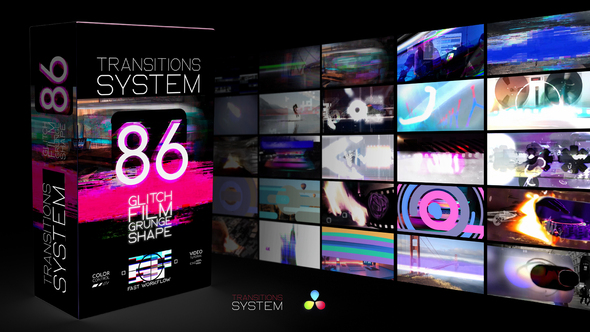
Transitions System 86 is a DaVinci Resolve template pack with 86 glitch, film, and grunge transitions. Mix and reuse them for fast, modern edits. No plugins required.

Free Download Transitions System 86. For editors who need speed without losing visual consistency, this DaVinci Resolve pack delivers 86 high-quality transitions built for modern workflows.
Mix and reuse the Glitch, Film, and Grunge styles inside a system-based structure. Every cut stays visually strong without overloading your edit.
Easy to use and fast to customize, with a tutorial included and no plugins required. Created by 4Kdis.

Overview of Transitions System 86

Transitions System 86 is a DaVinci Resolve template pack with 86 high-quality video transitions for fast, modern editing workflows. You can mix and reuse the transitions while keeping visual consistency. The set includes Glitch, Film, and Grunge styles and follows a system-based structure that keeps the collection easy to manage.
Each transition is built to be quick to customize and visually strong without overloading your edit. That makes the pack useful for editors who want speed, a clean look, and a reusable transition set. The focus stays on practical editing: swap transitions, adjust them, and keep the overall look consistent. No plugins are required, and a tutorial video is included. Music is not included.

Features of Transitions System 86

  • 86 high-quality video transitions built for DaVinci Resolve projects.
  • Glitch, Film, and Grunge styles sit inside one system-based collection.
  • Made for fast, modern editing workflows and professional post work.
  • Every transition is built to be easy to use, fast to customize, and visually strong.
  • Transitions mix and reuse easily while keeping visual consistency across an edit.
  • The system-based structure supports quick swaps and repeated use.
  • Built to stay visually strong without overloading the edit.
  • No plugins required, so the transitions work directly inside DaVinci Resolve.
  • Tutorial video included to help you set up and use the transitions.
  • The preview uses Glitch transitions. Music is not included.

How to use Transitions System 86

  • 1. Open DaVinci Resolve and load the project where Transitions System 86 will go.
  • 2. Get the Transitions System 86 template from vfxdownload.net.
  • 3. Add the template to your DaVinci Resolve project with the method supplied for that template.
  • 4. Place the transition between two clips on the timeline. Keep it on the edit point you want to soften.
  • 5. Check the cut in the viewer. Play the timeline from a few seconds before the transition to a few seconds after it.
  • 6. Adjust timing or settings only if the template includes controls for them.
  • 7. Test the transition on a short section first. Repeat it on other cuts only if it fits the edit.
  • 8. Save the project after placement.
  • 9. Render or export the finished timeline when the result looks right.

Download More For Free :

  • Premiere Pro Templates
  • After Effects project
  • Apple Motion Templates
  • Graphics & Vector Art
  • Free Sound Effects
  • Plugin & Script

Transitions System 86 Demo and Download

Scroll to the download section on this page and click the download button to get Transitions System 86 from vfxdownload.net. This DaVinci Resolve template pack includes 86 transitions in Glitch, Film, and Grunge styles. It uses a system-based structure and needs no plugins. A tutorial video is included. Download it when you are ready to add fast, modern transitions to your edit.

https://s3.envato.com/h264-video-previews/b88063dc-6108-406d-977e-a5c19725cb1f/61898290.mp4

VideoHive – Transitions System 86 | Size: 834.05 MB

HOW TO DOWNLOAD INFORMATION

Premium Fast-Speed Links

Fast Prefiles  NitroFlare  Turbobit  RapidGator

Free Slow-Speed Links

File-Up  Usersdrive

Disclaimer

Transitions System 86 is a DaVinci Resolve template by VideoHive. The demo content shown here is provided for educational use only and is not intended for commercial projects. Commercial use requires a purchase from vfxdownload.net. No rights are granted for resale or redistribution. All product names and trademarks belong to their respective owners.
Join @vfxdownloadnet on Telegram
Tags: davinci resolvedistortDynamicerrorextremeFilm TransitionsGlitchglitch transitionsgrunge transitionsMotion DesigntransitionsTransitions System 86Transitions System 86 61898290Transitions System 86 downloadTransitions System 86 for DaVinci Resolvevideo editingvideo transitionsVideohive Transitions System 86Videohive Transitions System 86 61898290Videohive Transitions System 86 61898290 Free DownloadVideohive Transitions System 86 Free Download

Related Posts

VideoHive Pro Camera Zoom Transitions for DaVinci Resolve 61897687
DaVinci Resolve

VideoHive Pro Camera Zoom Transitions for DaVinci Resolve 61897687

November 25, 2026
VideoHive Retro Film Burn Transitions — Dust, Grain & Stretch Pack | 4K DaVinci Resolve 64247737
DaVinci Resolve

VideoHive Retro Film Burn Transitions — Dust, Grain & Stretch Pack | 4K DaVinci Resolve 64247737

November 17, 2026
VideoHive Digital Glitch Transition For DaVinci Resolve 64148256
DaVinci Resolve

VideoHive Digital Glitch Transition For DaVinci Resolve 64148256

November 17, 2026
VideoHive Authentic Analog Film Marker Transitions Pack 4K \ Vertical 64247568
DaVinci Resolve

VideoHive Authentic Analog Film Marker Transitions Pack 4K \ Vertical 64247568

November 17, 2026
VideoHive Viral Transitions for DaVinci Resolve 64055912
DaVinci Resolve

VideoHive Viral Transitions for DaVinci Resolve 64055912

November 5, 2026
VideoHive Ultimate Flash & Light Leaks Transitions Bundle DaVinci Resolve 63917541
DaVinci Resolve

VideoHive Ultimate Flash & Light Leaks Transitions Bundle DaVinci Resolve 63917541

November 5, 2026
0 0 votes
Article Rating
Subscribe
Notify of

This site uses Akismet to reduce spam. Learn how your comment data is processed.

0 Comments
Oldest
Newest Most Voted

Categories

Subscribe VFX

Join Chat Group

VFX Request Bots

Most Popular Packs!!!

How To Download Files

Free Download!!!!!!


Facebook Telegram

Pages

  • Advertise
  • Contact Us
  • DMCA
  • How To Download
  • Privacy Policy
  • Search
  • VFXDownload.Net

Top Categories

  • After Effects
  • Adobe Premiere Pro
  • Free Course
  • Motion Graphics
  • Exclusive
  • Google Drive Courses/Packs
  • Plugin & Script

Copyright © 2020-2025 VFXDownload.Net

No Result
View All Result
  • After Effects
    • After Effects Project
    • Audio Spectrum
    • Title
    • Elements
    • Openers
    • Promo
    • Video Displays
    • Music Visualizer
    • Logo Opener/String/Intro
  • Premiere Pro
    • Premiere Pro Logo
    • MOGRT
    • Premiere Pro Project
    • Title
  • Graphics & Arts
  • Sounds
  • Courses
  • Plugins & Scripts

Copyright © 2020-2025 VFXDownload.Net

wpDiscuz
0
0
Would love your thoughts, please comment.x
()
x
| Reply