• Home
  • DMCA
  • Contact Us
  • Advertise
Subscribe On Telegram
Chat With Us
Request Anything
Monday, November 16, 2026
VFXDownload.Net
  • After Effects
    • After Effects Project
    • Audio Spectrum
    • Title
    • Elements
    • Openers
    • Promo
    • Video Displays
    • Music Visualizer
    • Logo Opener/String/Intro
  • Premiere Pro
    • Premiere Pro Logo
    • MOGRT
    • Premiere Pro Project
    • Title
  • Graphics & Arts
  • Sounds
  • Courses
  • Plugins & Scripts
No Result
View All Result
VFXDownload.Net
  • After Effects
    • After Effects Project
    • Audio Spectrum
    • Title
    • Elements
    • Openers
    • Promo
    • Video Displays
    • Music Visualizer
    • Logo Opener/String/Intro
  • Premiere Pro
    • Premiere Pro Logo
    • MOGRT
    • Premiere Pro Project
    • Title
  • Graphics & Arts
  • Sounds
  • Courses
  • Plugins & Scripts
No Result
View All Result
VFXDownload.Net
No Result
View All Result
Home After Effects

VideoHive Torn Paper Mask Transition 65732866

November 16, 2026
in After Effects, Elements
0
VideoHive Torn Paper Mask Transition 65732866
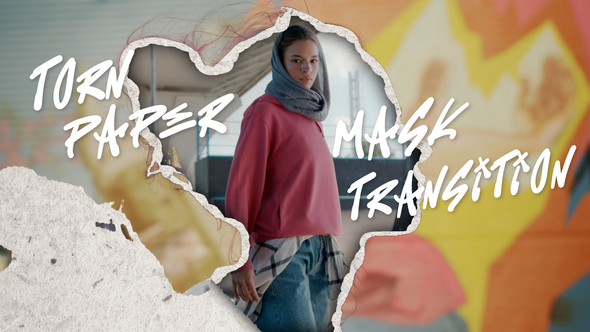
Torn Paper Mask Transition is an After Effects template with hand-torn paper rip masks, layered collage depth, and gritty textures for music videos, street fashion, and social reels.

Free Download Torn Paper Mask Transition. This After Effects template gives editors and filmmakers a tactile way to cut scenes. Jagged paper-rip masks split footage with organic fiber textures, layered collage depth, and bold marker-style type. You can adjust timing, color grades, and mask placement to match the edit. Full HD and 4K setups work without plugins.

Overview of Torn Paper Mask Transition

Torn Paper Mask Transition is an After Effects template pack by pitstud_motion for editors, content creators, social media directors, and filmmakers who want cuts with attitude. It uses hand-torn paper edge masks, layered collage depth, and multi-directional rip variants to replace clean wipes with rough, tactile reveals.
The set includes gritty fiber detail, an urban palette of warm oranges, dusty yellows, faded pinks, and cool grays, plus expressive marker-style title overlays. You can swap footage, adjust timing, change color grades, and reposition masks. Compositions come in Full HD and 4K, no plugins are required, and the package includes a video tutorial and free fonts. Images and preview music are not included.

Features of Torn Paper Mask Transition

  • Built for After Effects, it uses hand-torn paper edge masks that split the frame with irregular, fibrous reveals.
  • Layered collage compositing blends foreground footage with blurred background layers for depth and an editorial mixed-media feel.
  • Multi-directional rip variants cover diagonal, vertical, horizontal, and freeform angles for motion-matched cuts.
  • High-resolution paper fiber detail adds torn ridges, crumpled folds, and shadow depth to each mask edge.
  • An urban palette of warm oranges, dusty yellows, faded pinks, and cool grays suits fashion, lifestyle, music, and sports edits.
  • Marker-style hand-lettered title overlays let you add names or slogans inside the transition moment.
  • Editors can swap placeholders, adjust timing, change color grades, and reposition masks.
  • Modular transitions mix, stack, and sequence without clip dependencies. Full HD and 4K compositions run at 29.97 fps with no plugins, an organized project, a video tutorial, and free fonts.

How to use Torn Paper Mask Transition

  • 1. Open After Effects and load the Torn Paper Mask Transition project from vfxdownload.net.
  • 2. In the Project panel, locate and open the composition that holds the transition.
  • 3. Add your outgoing clip and incoming clip to the timeline in the order you want.
  • 4. Swap the template media for your own footage in the layers used by the transition.
  • 5. Move the torn paper mask transition so it sits between the two clips.
  • 6. Trim the transition start and end to match your cut.
  • 7. Scrub the timeline and check the mask reveal at the cut point.
  • 8. Adjust layer order or timing if your edit needs a different result.
  • 9. Set the work area around the transition and preview it at full quality.
  • 10. Render the final composition when the transition looks right.

Download More For Free :

  • Premiere Pro Templates
  • After Effects project
  • Apple Motion Templates
  • Graphics & Vector Art
  • Free Sound Effects
  • Plugin & Script

Torn Paper Mask Transition Demo and Download

To download Torn Paper Mask Transition from vfxdownload.net, scroll to the download section on the page and click the download button. The template is built for After Effects and uses jagged paper-rip reveals, organic edge textures, and bold typography. Check the page details before you start. Download the file, open it in After Effects, and use the transition in your edit. Keep the source page handy for reference.

https://s3.envato.com/h264-video-previews/b95a7f67-c5e0-4d28-a2ee-caac89398b7c/65732866.mp4

VideoHive – Torn Paper Mask Transition | Size: 58.85 MB

HOW TO DOWNLOAD INFORMATION

Premium Fast-Speed Links

Fast Prefiles  NitroFlare  Turbobit  RapidGator

Free Slow-Speed Links

File-Up  Usersdrive

Disclaimer

This disclaimer covers the Torn Paper Mask Transition template by VideoHive. The demo content is for educational use only. It does not grant commercial rights. Commercial use requires a purchase from vfxdownload.net. All product details, rights, and licensing terms remain with their respective owners. This notice does not imply endorsement or affiliation. Please verify licensing before use.

Join @vfxdownloadnet on Telegram
Tags: aestheticanimationbounceCinematiccleancollageCreativecrumpledcutoutdistressedDynamiceditingeditorialfilmmakerFramegrungemaskmediaModernmontagemotionOpeneroverlaypaperPhotoPromoquickRevealripSlideSmoothSocialStreetStylishTemplatetexturedtornTorn Paper Mask TransitionTorn Paper Mask Transition 65732866Torn Paper Mask Transition downloadTorn Paper Mask Transition for After EffectstransitionunfoldUrbanverticalvideoVideohive Torn Paper Mask TransitionVideohive Torn Paper Mask Transition 65732866Videohive Torn Paper Mask Transition 65732866 Free DownloadVideohive Torn Paper Mask Transition Free DownloadVisualwipe

Related Posts

VideoHive Ultimate Emoji Bundle - 131 Animated Face Emoji 65746150
After Effects

VideoHive Ultimate Emoji Bundle – 131 Animated Face Emoji 65746150

November 16, 2026
VideoHive Star Award Show 65744643
After Effects

VideoHive Star Award Show 65744643

November 16, 2026
VideoHive Liquid Glass UI Elements - 30 Animated Glass Interface Elements 65708423
After Effects

VideoHive Liquid Glass UI Elements – 30 Animated Glass Interface Elements 65708423

November 16, 2026
VideoHive Hologram Projection Effects 65503824
After Effects

VideoHive Hologram Projection Effects 65503824

November 16, 2026
VideoHive Bracket Engine - CSV Tournament Bracket Infographics 65561905
After Effects

VideoHive Bracket Engine – CSV Tournament Bracket Infographics 65561905

November 16, 2026
VideoHive Elegant Real Estate Promo 65732886
After Effects

VideoHive Elegant Real Estate Promo 65732886

November 16, 2026
0 0 votes
Article Rating
Subscribe
Notify of

This site uses Akismet to reduce spam. Learn how your comment data is processed.

0 Comments
Oldest
Newest Most Voted

Categories

Subscribe VFX

Join Chat Group

VFX Request Bots

Most Popular Packs!!!

How To Download Files

Free Download!!!!!!


Facebook Telegram

Pages

  • Advertise
  • Contact Us
  • DMCA
  • How To Download
  • Privacy Policy
  • Search
  • VFXDownload.Net

Top Categories

  • After Effects
  • Adobe Premiere Pro
  • Free Course
  • Motion Graphics
  • Exclusive
  • Google Drive Courses/Packs
  • Plugin & Script

Copyright © 2020-2025 VFXDownload.Net

No Result
View All Result
  • After Effects
    • After Effects Project
    • Audio Spectrum
    • Title
    • Elements
    • Openers
    • Promo
    • Video Displays
    • Music Visualizer
    • Logo Opener/String/Intro
  • Premiere Pro
    • Premiere Pro Logo
    • MOGRT
    • Premiere Pro Project
    • Title
  • Graphics & Arts
  • Sounds
  • Courses
  • Plugins & Scripts

Copyright © 2020-2025 VFXDownload.Net

wpDiscuz
0
0
Would love your thoughts, please comment.x
()
x
| Reply