• Home
  • DMCA
  • Contact Us
  • Advertise
Subscribe On Telegram
Chat With Us
Request Anything
Saturday, November 14, 2026
VFXDownload.Net
  • After Effects
    • After Effects Project
    • Audio Spectrum
    • Title
    • Elements
    • Openers
    • Promo
    • Video Displays
    • Music Visualizer
    • Logo Opener/String/Intro
  • Premiere Pro
    • Premiere Pro Logo
    • MOGRT
    • Premiere Pro Project
    • Title
  • Graphics & Arts
  • Sounds
  • Courses
  • Plugins & Scripts
No Result
View All Result
VFXDownload.Net
  • After Effects
    • After Effects Project
    • Audio Spectrum
    • Title
    • Elements
    • Openers
    • Promo
    • Video Displays
    • Music Visualizer
    • Logo Opener/String/Intro
  • Premiere Pro
    • Premiere Pro Logo
    • MOGRT
    • Premiere Pro Project
    • Title
  • Graphics & Arts
  • Sounds
  • Courses
  • Plugins & Scripts
No Result
View All Result
VFXDownload.Net
No Result
View All Result
Home Adobe Premiere Pro

VideoHive Retro Aged Paper Dust Overlays Premiere Pro 61704440

November 13, 2026
in Adobe Premiere Pro
0
VideoHive Retro Aged Paper Dust Overlays Premiere Pro 61704440
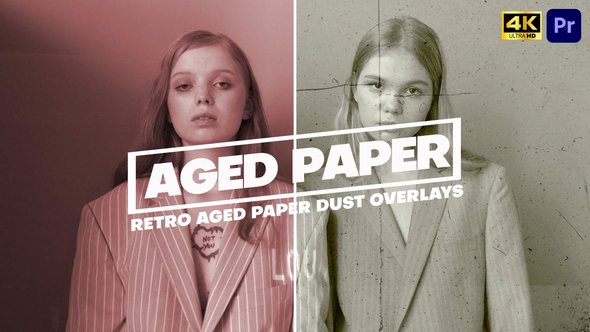
A pack of 11 retro aged paper dust overlays for Premiere Pro, adding authentic film grain, scratches, and dust for vintage, archival video and photo looks.

Free Download Retro Aged Paper Dust Overlays Premiere Pro. This pack gives Adobe Premiere Pro editors 11 retro paper dust overlays for an authentic vintage, old-film look. Each layer adds realistic dust, paper grain, scratches, and subtle noise inspired by classic film scans.
Created by Power_FX_Studios, the set suits cinematic, documentary, fashion, and creative cuts. Use Screen, Add, or Overlay blend modes for a quick archival finish.

Overview of Retro Aged Paper Dust Overlays Premiere Pro

Retro Aged Paper Dust Overlays Premiere Pro packs 11 vintage overlays for building an old film or archival look in video and photo edits. Each overlay adds realistic dust particles, paper grain, scratches, and subtle noise inspired by classic film scans and aged paper textures. The finish is clean, high quality, and professional.
Editors can apply the set with Screen, Add, or Overlay blend modes, so it fits into modern Premiere Pro workflows. Use it for cinematic, documentary, fashion, and creative projects that need a worn paper or dusty film character. It suits creators who want a retro, archival, old-photo inspired style with simple blend-mode use.

Features of Retro Aged Paper Dust Overlays Premiere Pro

  • 11 unique vintage paper dust overlays for video and photo projects.
  • Each overlay features realistic dust particles, paper grain, scratches, and subtle noise.
  • Textures are inspired by classic film scans and aged paper for an authentic archival look.
  • The pack supports a cinematic retro aesthetic with an old film and old-photo feel.
  • Built for Adobe Premiere Pro, the overlays fit modern editing workflows while keeping the old-school character intact.
  • High-quality, clean, and professional results with easy Screen, Add, or Overlay blend mode use.
  • Suited to cinematic, documentary, fashion, and creative projects.

How to use Retro Aged Paper Dust Overlays Premiere Pro

  • 1. Open Adobe Premiere Pro and load the video edit that needs the aged paper texture.
  • 2. Get the Retro Aged Paper Dust Overlays files from vfxdownload.net. Keep the folder in a location you can find quickly.
  • 3. Import the overlay files into your Premiere Pro project.
  • 4. Drag one overlay onto a video track above your footage.
  • 5. Trim the overlay to the length you need. Slide it over the section that should look aged.
  • 6. Adjust opacity and blending until the paper dust sits naturally over the shot without covering the main action.
  • 7. Preview the sequence at normal playback speed. Make small timing or strength changes if the texture draws too much attention.
  • 8. Repeat with another overlay for other scenes in the timeline, then export the finished edit.

Download More For Free :

  • Premiere Pro Templates
  • After Effects project
  • Apple Motion Templates
  • Graphics & Vector Art
  • Free Sound Effects
  • Plugin & Script

Retro Aged Paper Dust Overlays Premiere Pro Demo and Download

To download Retro Aged Paper Dust Overlays Premiere Pro, scroll to the download section on vfxdownload.net and click the download button. The pack includes 11 retro aged paper dust overlays with realistic dust, paper grain, scratches, and subtle noise. Created by Power_FX_Studios. Use these overlays for a vintage film and archival look. No extra steps. Just grab the files and start editing.

https://s3.envato.com/h264-video-previews/3e16f4db-783c-416e-9915-0d31df39d468/61704440.mp4

VideoHive – Retro Aged Paper Dust Overlays Premiere Pro | Size: 6.94 MB

HOW TO DOWNLOAD INFORMATION

Premium Fast-Speed Links

Fast Prefiles  NitroFlare  Turbobit  RapidGator

Free Slow-Speed Links

File-Up  Usersdrive

Disclaimer

The Retro Aged Paper Dust Overlays Premiere Pro template by VideoHive is shared here for educational and preview purposes only. All demo content remains the property of its original creator. Commercial use requires a purchase from vfxdownload.net. We do not grant rights, ownership, or resale permission for this template.

Join @vfxdownloadnet on Telegram
Tags: agedanalogantiquearchivebackgroundCinematicclassicdirtydustdustyeffectfadedFilmfilmlookgraingrungenoisenostalgiaoldoldfilmoverlayoverlayfxpaperpaperfxRetroRetro Aged Paper Dust Overlays Premiere ProRetro Aged Paper Dust Overlays Premiere Pro 61704440Retro Aged Paper Dust Overlays Premiere Pro downloadRetro Aged Paper Dust Overlays Premiere Pro for Adobe Premiere ProscratchtexturevhsVideohive Retro Aged Paper Dust Overlays Premiere ProVideohive Retro Aged Paper Dust Overlays Premiere Pro 61704440Videohive Retro Aged Paper Dust Overlays Premiere Pro 61704440 Free DownloadVideohive Retro Aged Paper Dust Overlays Premiere Pro Free DownloadVintage

Related Posts

VideoHive X-Ray Human Transitions | Premiere Pro 61752885
Adobe Premiere Pro

VideoHive X-Ray Human Transitions | Premiere Pro 61752885

November 13, 2026
VideoHive Slideshow | Photo Slideshow MOGRT 61758579
Adobe Premiere Pro

VideoHive Slideshow | Photo Slideshow MOGRT 61758579

November 13, 2026
VideoHive Light Mask Transitions for Premiere Pro 61676905
Adobe Premiere Pro

VideoHive Light Mask Transitions for Premiere Pro 61676905

November 13, 2026
VideoHive Glow Text Presets 61753028
Adobe Premiere Pro

VideoHive Glow Text Presets 61753028

November 13, 2026
VideoHive Futuristic Digital Slideshow for Premiere Pro 61673846
Adobe Premiere Pro

VideoHive Futuristic Digital Slideshow for Premiere Pro 61673846

November 13, 2026
VideoHive Abstract Color Lines Grunge Transition – Analog Color & Grunge FX Pr 61702951
Adobe Premiere Pro

VideoHive Abstract Color Lines Grunge Transition – Analog Color & Grunge FX Pr 61702951

November 13, 2026
0 0 votes
Article Rating
Subscribe
Notify of

This site uses Akismet to reduce spam. Learn how your comment data is processed.

0 Comments
Oldest
Newest Most Voted

Categories

Subscribe VFX

Join Chat Group

VFX Request Bots

Most Popular Packs!!!

How To Download Files

Free Download!!!!!!


Facebook Telegram

Pages

  • Advertise
  • Contact Us
  • DMCA
  • How To Download
  • Privacy Policy
  • Search
  • VFXDownload.Net

Top Categories

  • After Effects
  • Adobe Premiere Pro
  • Free Course
  • Motion Graphics
  • Exclusive
  • Google Drive Courses/Packs
  • Plugin & Script

Copyright © 2020-2025 VFXDownload.Net

No Result
View All Result
  • After Effects
    • After Effects Project
    • Audio Spectrum
    • Title
    • Elements
    • Openers
    • Promo
    • Video Displays
    • Music Visualizer
    • Logo Opener/String/Intro
  • Premiere Pro
    • Premiere Pro Logo
    • MOGRT
    • Premiere Pro Project
    • Title
  • Graphics & Arts
  • Sounds
  • Courses
  • Plugins & Scripts

Copyright © 2020-2025 VFXDownload.Net

wpDiscuz
0
0
Would love your thoughts, please comment.x
()
x
| Reply