• Home
  • DMCA
  • Contact Us
  • Advertise
Subscribe On Telegram
Chat With Us
Request Anything
Sunday, November 15, 2026
VFXDownload.Net
  • After Effects
    • After Effects Project
    • Audio Spectrum
    • Title
    • Elements
    • Openers
    • Promo
    • Video Displays
    • Music Visualizer
    • Logo Opener/String/Intro
  • Premiere Pro
    • Premiere Pro Logo
    • MOGRT
    • Premiere Pro Project
    • Title
  • Graphics & Arts
  • Sounds
  • Courses
  • Plugins & Scripts
No Result
View All Result
VFXDownload.Net
  • After Effects
    • After Effects Project
    • Audio Spectrum
    • Title
    • Elements
    • Openers
    • Promo
    • Video Displays
    • Music Visualizer
    • Logo Opener/String/Intro
  • Premiere Pro
    • Premiere Pro Logo
    • MOGRT
    • Premiere Pro Project
    • Title
  • Graphics & Arts
  • Sounds
  • Courses
  • Plugins & Scripts
No Result
View All Result
VFXDownload.Net
No Result
View All Result
Home After Effects

VideoHive Messenger Chats 2026 – Text Message Pack 65806898

November 15, 2026
in After Effects, Elements
0
VideoHive Messenger Chats 2026 - Text Message Pack 65806898
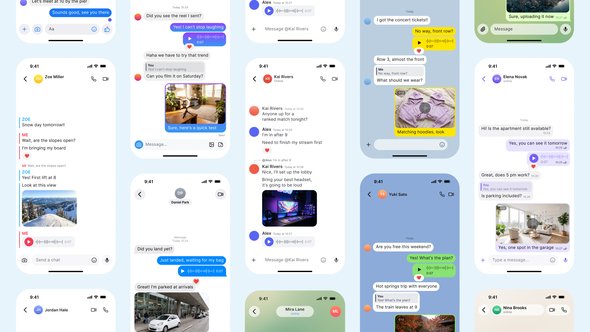
Messenger Chats 2026 is an After Effects template pack with 12 editable chat screens styled after popular messengers, iOS 26 controls, and auto-sizing bubbles.

Free Download Messenger Chats 2026 – Text Message Pack. Messenger Chats 2026 is a 12-screen chat pack for After Effects styled after popular messaging apps, with an iOS 26 status bar. Type your own conversation and the bubbles, read receipts and feed resize themselves. Light and dark themes, 4K output, no plugins.

Overview of Messenger Chats 2026 – Text Message Pack

Messenger Chats 2026 is a text message pack for After Effects from BubbleFX with 12 chat screens styled after familiar messengers and rebuilt with an iOS 26 status bar and controls. Type your own conversation and the bubbles, read receipts, and full feed resize and scroll by themselves. Each chat includes seven message types, from typing indicators to voice messages, plus light and dark themes.
The pack comes in 2160×3840 (9:16, 4K) and 2160×4696 for iPhone 17 Pro mockup screens. Text edits live in EDIT_TXT layers, and every main composition is ready for Essential Graphics. No plugins are required. It suits editors, social media creators, and motion designers who need realistic chat scenes without building the interface from scratch.
Works in After Effects 2026 (26.5) or newer.

Features of Messenger Chats 2026 – Text Message Pack

  • 12 editable chat screens styled after Telegram, WhatsApp, iMessage, Messenger, Discord, Instagram Direct, Signal, Viber, WeChat, LINE, KakaoTalk and Snapchat.
  • Two canvas sizes: 2160×3840 for 9:16 4K and 2160×4696 for iPhone 17 Pro mockup screens.
  • Seven message types in every chat: typing indicator, reaction, read receipt, photo or video, voice message, reply, plus header and input bar.
  • Light and dark themes switch with one checkbox.
  • Bubbles resize automatically when you edit text, and the feed scrolls on its own.
  • Use your own photo or video in the media message. Adjust accent, avatar and wallpaper colours from one controller.
  • All copy sits in EDIT_TXT layers in the main composition. Every main comp is set up for Essential Graphics inside After Effects.
  • AE 2026 (26.5) or newer, 30 fps, 8 seconds per chat. No plugins. PDF help included.

How to use Messenger Chats 2026 – Text Message Pack

  • Open the Messenger Chats 2026 project file in After Effects.
  • Browse the Project panel and open the chat composition you want to edit first.
  • Select the text layers that contain the sample message copy.
  • Replace each sample message with your own text. Keep each line short so it fits cleanly inside the chat bubbles.
  • Move or trim message layers on the timeline to control the order and pace of the conversation.
  • Adjust the composition duration or work area settings so the full chat sequence plays before you render.
  • Preview the composition and check timing, spacing, and readability.
  • Repeat the text and timing edits for every chat scene you need.
  • Save the project, then render the finished composition from After Effects.

Download More For Free :

  • Premiere Pro Templates
  • After Effects project
  • Apple Motion Templates
  • Graphics & Vector Art
  • Free Sound Effects
  • Plugin & Script

Messenger Chats 2026 – Text Message Pack Demo and Download

To download Messenger Chats 2026 – Text Message Pack from vfxdownload.net, scroll to the download section and click the download button. This After Effects template from BubbleFX gives you 12 realistic, fully editable chat screens with an iOS 26 status bar and controls. Type your own conversation and the bubbles, read receipts, and feed resize and scroll by themselves. Use the download button on that page to get the pack.

https://s3.envato.com/h264-video-previews/77d18cbc-cc68-4c95-8f8f-9f99fab214ff/65806898.mp4

VideoHive – Messenger Chats 2026 – Text Message Pack | Size: 2.17 MB

HOW TO DOWNLOAD INFORMATION

Premium Fast-Speed Links

Fast Prefiles  NitroFlare  Turbobit  RapidGator

Free Slow-Speed Links

File-Up  Usersdrive

Disclaimer

The Messenger Chats 2026 – Text Message Pack is an After Effects template by VideoHive. This demo content is for educational use only and is not intended for commercial projects. Commercial use requires a purchase from vfxdownload.net. No rights are granted beyond this educational preview. Review the applicable license terms before use.

Join @vfxdownloadnet on Telegram
Tags: Appbubbleschatchat appchat bubbleconversationdark modedirect messagediscorddmemojiiMessageInstagraminterfaceiosiphonekakaotalkLinemessagesmessengerMessenger Chats 2026 - Text Message PackMessenger Chats 2026 - Text Message Pack 65806898Messenger Chats 2026 - Text Message Pack downloadMessenger Chats 2026 - Text Message Pack for After EffectsmobileMockupnotificationphonereactionread receiptreelsreplyscreenshortssignalsmssnapchatSocial MediaStorytelegramtext messagetextingTypinguiultra hdverticalviberVideohive Messenger Chats 2026 - Text Message PackVideohive Messenger Chats 2026 - Text Message Pack 65806898Videohive Messenger Chats 2026 - Text Message Pack 65806898 Free DownloadVideohive Messenger Chats 2026 - Text Message Pack Free Downloadvoice messagewechatwhatsapp

Related Posts

VideoHive YouTube Subscribe Pack 65647961
After Effects

VideoHive YouTube Subscribe Pack 65647961

November 15, 2026
VideoHive Vertical Bento Split Screens Bundle 65802861
After Effects

VideoHive Vertical Bento Split Screens Bundle 65802861

November 15, 2026
VideoHive Type Forge 65819965
After Effects

VideoHive Type Forge 65819965

November 15, 2026
VideoHive Toolkit – ASCII Art Effects 65802639
After Effects

VideoHive Toolkit – ASCII Art Effects 65802639

November 15, 2026
VideoHive Detective Board - True Crime Opener 65731066
After Effects

VideoHive Detective Board – True Crime Opener 65731066

November 15, 2026
VideoHive Bold Typography Beat Reveal Intro 65800301
After Effects

VideoHive Bold Typography Beat Reveal Intro 65800301

November 15, 2026
0 0 votes
Article Rating
Subscribe
Notify of

This site uses Akismet to reduce spam. Learn how your comment data is processed.

0 Comments
Oldest
Newest Most Voted

Categories

Subscribe VFX

Join Chat Group

VFX Request Bots

Most Popular Packs!!!

How To Download Files

Free Download!!!!!!


Facebook Telegram

Pages

  • Advertise
  • Contact Us
  • DMCA
  • How To Download
  • Privacy Policy
  • Search
  • VFXDownload.Net

Top Categories

  • After Effects
  • Adobe Premiere Pro
  • Free Course
  • Motion Graphics
  • Exclusive
  • Google Drive Courses/Packs
  • Plugin & Script

Copyright © 2020-2025 VFXDownload.Net

No Result
View All Result
  • After Effects
    • After Effects Project
    • Audio Spectrum
    • Title
    • Elements
    • Openers
    • Promo
    • Video Displays
    • Music Visualizer
    • Logo Opener/String/Intro
  • Premiere Pro
    • Premiere Pro Logo
    • MOGRT
    • Premiere Pro Project
    • Title
  • Graphics & Arts
  • Sounds
  • Courses
  • Plugins & Scripts

Copyright © 2020-2025 VFXDownload.Net

wpDiscuz
0
0
Would love your thoughts, please comment.x
()
x
| Reply