• Home
  • DMCA
  • Contact Us
  • Advertise
Subscribe On Telegram
Chat With Us
Request Anything
Sunday, November 29, 2026
VFXDownload.Net
  • After Effects
    • After Effects Project
    • Audio Spectrum
    • Title
    • Elements
    • Openers
    • Promo
    • Video Displays
    • Music Visualizer
    • Logo Opener/String/Intro
  • Premiere Pro
    • Premiere Pro Logo
    • MOGRT
    • Premiere Pro Project
    • Title
  • Graphics & Arts
  • Sounds
  • Courses
  • Plugins & Scripts
No Result
View All Result
VFXDownload.Net
No Result
View All Result
Home Adobe Premiere Pro

VideoHive Cinematic Titles – Premiere Pro CC 61575780

November 29, 2026
in Adobe Premiere Pro, Premiere Pro Title
0
VideoHive Cinematic Titles - Premiere Pro CC 61575780
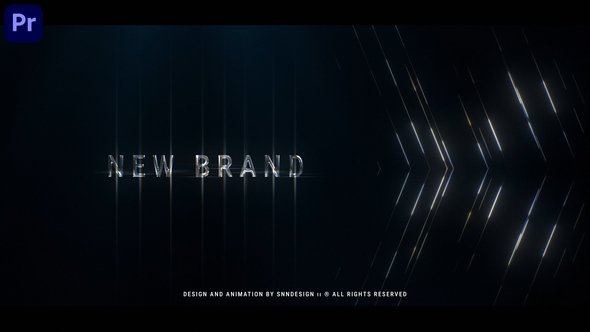
Cinematic Titles for Premiere Pro CC is a template pack with 5 editable title scenes, glowing light streaks, Color Control, no plugins, and support for CC 2022 and above.

Free Download Cinematic Titles – Premiere Pro CC. SnnDesign’s Premiere Pro pack gives editors five editable title scenes built for intros, trailers, promos, and modern video work.
It uses a clean futuristic look, glowing light streaks, and smooth motion, plus easy text replacement, Color Control, and no plugins required for fast, clean renders in Adobe Premiere Pro CC 2022 and above.

Overview of Cinematic Titles – Premiere Pro CC

Cinematic Titles for Premiere Pro CC delivers five unique title scenes with a clean futuristic look, glowing light streaks, and smooth motion. Each scene is fully editable, so you can type your text, adjust colors through the included Color Control, and render. It runs on Premiere Pro CC 2022 or above and needs no plugins. A help tutorial is included, along with fast render times and a clean design that suits cinematic, modern, or futuristic edits.
Use it for movie and trailer titles, YouTube intros, brand presentations, cinematic promos, documentary and film projects, and social media videos. Five ready-made scenes and easy text replacement keep the workflow direct. If you need title animation without building it from scratch, this package covers the main use cases.

Features of Cinematic Titles – Premiere Pro CC

  • Includes 5 unique cinematic title scenes for Adobe Premiere Pro CC 2022 and above.
  • Each scene is fully editable and easy to customize. Type your text, adjust colors with Color Control, and render.
  • Clean futuristic look with glowing light streaks and smooth motion for intros, trailers, promos, and modern video edits.
  • No plugins required. The template runs inside Adobe Premiere Pro and keeps the setup simple.
  • Fast render and clean design support quick edits across cinematic, modern, and futuristic video styles.
  • Help and tutorial files are included for setup and customization.
  • Works for movie and trailer titles, YouTube openers, brand presentations, cinematic promos, documentary projects, and social media videos.

How to use Cinematic Titles – Premiere Pro CC

  • Open Adobe Premiere Pro and create or open the project where the titles will appear.
  • Import the Cinematic Titles – Premiere Pro CC template into that project.
  • Locate the title sequence in the imported files and drag it onto your timeline.
  • Move the clip to the point in the edit where the title should start.
  • Select the text layer you need to change and replace the placeholder text with your own wording.
  • Repeat the text change for each title in the sequence.
  • If the sequence contains more than one title card, place each one where it belongs.
  • Adjust the clip length when your edit needs a shorter or longer hold.
  • Preview the result in the Program Monitor and check the timing.
  • Make any final timing changes, save the project, and export when ready.

Download More For Free :

  • Premiere Pro Templates
  • After Effects project
  • Apple Motion Templates
  • Graphics & Vector Art
  • Free Sound Effects
  • Plugin & Script

Cinematic Titles – Premiere Pro CC Demo and Download

To download Cinematic Titles – Premiere Pro CC from vfxdownload.net, open the template page and review the 5 editable title scenes. Scroll to the download section and click the download button. Created by SnnDesign, the package works in Adobe Premiere Pro and suits intros, trailers, promos, and modern edits. Check the page details before you download. The process is direct.

https://s3.envato.com/h264-video-previews/26b08cb1-90a8-4579-85cb-a3bde6fec6ed/61575780.mp4

VideoHive – Cinematic Titles – Premiere Pro CC | Size: 120.47 MB

HOW TO DOWNLOAD INFORMATION

Premium Fast-Speed Links

Fast Prefiles  NitroFlare  Turbobit  RapidGator

Free Slow-Speed Links

File-Up  Usersdrive

Disclaimer

This article covers the Cinematic Titles template for Adobe Premiere Pro CC, credited to VideoHive as listed on vfxdownload.net. All demo content shown here is for educational use only. It does not grant rights for commercial projects. If you plan to use these titles in client work, paid ads, or any monetized release, purchase the template directly from vfxdownload.net.


Join @vfxdownloadnet on Telegram
Tags: AbstractbackgroundbluechromeCinemaCinematicCinematic IntroCinematic Titles - Premiere Pro CCCinematic Titles - Premiere Pro CC 61575780Cinematic Titles - Premiere Pro CC downloadCinematic Titles - Premiere Pro CC for Adobe Premiere ProCinematic trailerdarkdustfilm introfilm trailerFireflareglossyinspiringIntrologoMetalMovieOpenerparticlesplaceholdersPromoRevealsilverSlideshowsparksSportteasertextTitlesTrailertvVideohive Cinematic Titles - Premiere Pro CCVideohive Cinematic Titles - Premiere Pro CC 61575780Videohive Cinematic Titles - Premiere Pro CC 61575780 Free DownloadVideohive Cinematic Titles - Premiere Pro CC Free Downloadyoutube

Related Posts

VideoHive Hanging Hearts Valentine Promo for After Effects & Premiere Pro | 6 Romantic Variations 61574346
Adobe Premiere Pro

VideoHive Hanging Hearts Valentine Promo for After Effects & Premiere Pro | 6 Romantic Variations 61574346

November 29, 2026
VideoHive Glitch Logo 61544869
Adobe Premiere Pro

VideoHive Glitch Logo 61544869

November 29, 2026
VideoHive Fast Light Leaks Transitions for Reels, Shorts & YouTube For Premiere Pro 61575717
Adobe Premiere Pro

VideoHive Fast Light Leaks Transitions for Reels, Shorts & YouTube For Premiere Pro 61575717

November 29, 2026
VideoHive Cinematic Titles 61548535
Adobe Premiere Pro

VideoHive Cinematic Titles 61548535

November 29, 2026
VideoHive Smoky Neon & Lightning Titles 61577121
Adobe Premiere Pro

VideoHive Smoky Neon & Lightning Titles 61577121

November 28, 2026
VideoHive Ramadan Opener 61572011
Adobe Premiere Pro

VideoHive Ramadan Opener 61572011

November 28, 2026
0 0 votes
Article Rating
Subscribe
Notify of

This site uses Akismet to reduce spam. Learn how your comment data is processed.

0 Comments
Oldest
Newest Most Voted

Categories

Subscribe VFX

Join Chat Group

VFX Request Bots

Most Popular Packs!!!

How To Download Files

Free Download!!!!!!


Facebook Telegram

Pages

  • Advertise
  • Contact Us
  • DMCA
  • How To Download
  • Privacy Policy
  • Search
  • VFXDownload.Net

Top Categories

  • After Effects
  • Adobe Premiere Pro
  • Free Course
  • Motion Graphics
  • Exclusive
  • Google Drive Courses/Packs
  • Plugin & Script

Copyright © 2020-2025 VFXDownload.Net

No Result
View All Result
  • After Effects
    • After Effects Project
    • Audio Spectrum
    • Title
    • Elements
    • Openers
    • Promo
    • Video Displays
    • Music Visualizer
    • Logo Opener/String/Intro
  • Premiere Pro
    • Premiere Pro Logo
    • MOGRT
    • Premiere Pro Project
    • Title
  • Graphics & Arts
  • Sounds
  • Courses
  • Plugins & Scripts

Copyright © 2020-2025 VFXDownload.Net

wpDiscuz
0
0
Would love your thoughts, please comment.x
()
x
| Reply