Free Download Blender Market – Face Cutter V1.8.0 for Blender new released version, Blender 3d software is compatible with this add-ons. It is a simple plugin that may be used by anyone. The Blender Market add-ons are designed to extend the capabilities of the software and make it easier to use. Add-ons can range from simple extensions that add more tools to the user interface, to more complex ones that add new features or integrate with external services. Have a look at this great addons for blender that you can use into your work.
Face Cutter is a Blender add-ons or Plugin. Face Cutter – Blender Market file information you can find on information button. VFXDownload.Net provides fresh and free digital assets for video editors, filmmaker, gamers and more. VFX uploaded files on some free and premium filehost. There you can download most of all free or pay on premium fast speed filehost. VFXDownload share Motion Graphics Elements, Transitions, Photoshop Plugins, Illustrator Plugins, Graphics & Vector, Creative market, videohive, Graphicriver, Stock Footages, After Effects Template, Plugin & Scripts, Premiere Pro Template, Sounds Effects, Free Luts, Free Courses, free softwares, etc in vfxdownload.net.
Face Cutter Information
Face Cutter is a handy modeling tool designed for cutting ngon face easily.
It allows you to cut perpendicular lines (or rotated) on selected face, by easily defined snapping points.

- Set number of divisions (snapping points), then cut by lines.
- Ability to cut through the whole mesh (using blender’s Knife projection API)
- Define a cut-line by two points
- Rotate a cut-line by angle
- Align a cut-line by any nearby edge.
It is a very convenient tool for general modeling task. It provides better functionalities comparing to original blender’s K knife tool. Also, it is similar to Ctrl R in blender, but this tool works on ngons too.

Usage
Edit mode > Select a face or multiple faces
Then right-click to open Context Menu, choose “Face Cutter” at the bottom of the menu.

Basic Cut
Select an edge (highlighted by yellow), then you can set “cutting lines” on the snapping point, or anywhere.
You can increase the number of snapping points by Ctrl + mouse wheel scrolling. (or you may use square bracket keys (the [ ] keys)).
After setting the cutting points, you can press Q key to execute cutting.
Note : You can hold Shift key anytime to turn off the snapping.

Cut through
In order to cut through the mesh, press R key to execute the cutting.
You can also press Shift + R key to limit the cut to linked faces only.

Fill Lines
You can quickly fill all the snapping points with lines by F key.

Rotate the Line
Z key or X key : Rotate the line by 5 degree.
C key or V key : Rotate the line by 1 degree.

Align the line to edge
You can align the line easily by pressing A key.
Just move your mouse cursor near an edge, then press A key.
To revert the line to original angle (perpendicular), move your cursor to your original selected edge then press A key.

Full Width Mode
When you work on multiple faces, sometimes you want to use the full side instead of small edge segment. You can press W key to toggle Full Width Mode.
In Full Width Mode, the tool will try to use the full side (all co-linear edges).

Multiple Cutting Lines
You can create multiple cutting lines based on different edge.
The tool allow you to create some cutting-lines on one side, then Press Esc key, to return to “Edge selection” state, then select another edge for the base, and then create new cutting-lines again. After all the lines set, press Q or R key to execute.

Undo
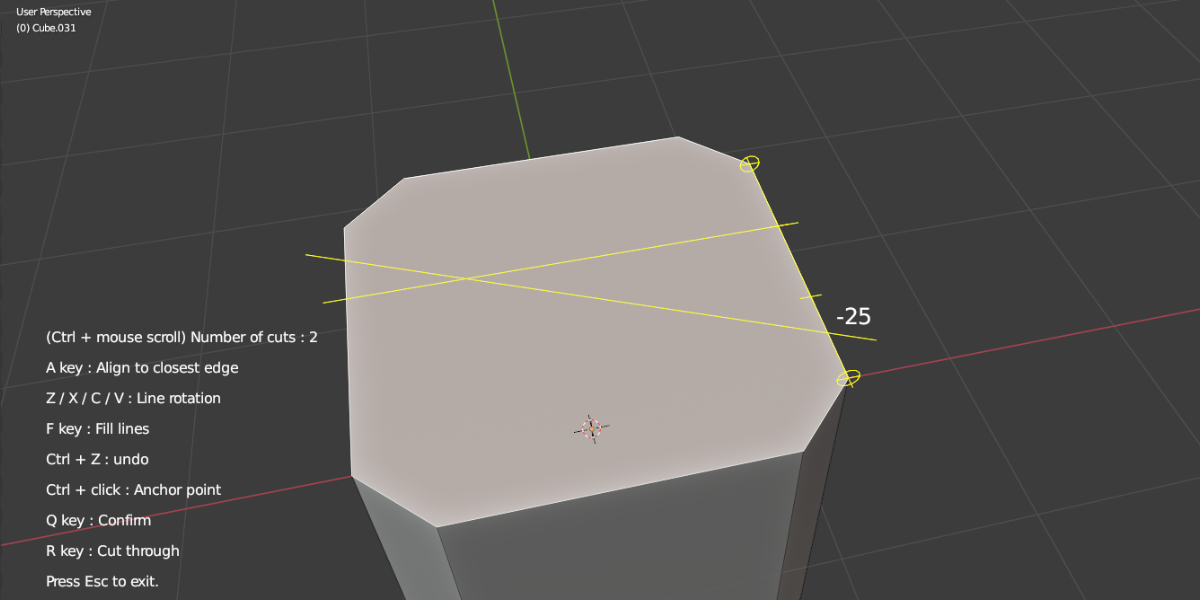
You can press Ctrl + Z key to undo a cutting-line (remove last added line). (below is the screenshot of tool hint text)

Symmetric Copy
You can easily copy all the cutting lines to another side by pressing S key.
If will copy all cutting lines as mirrored.

Cutting Corner (45 degree shortcut)
You can set the line rotation to 45 degree by just pressing D key. Pressing D key again will set it to -45 degree. It is convenient for cutting corners.

Easy Edit Mode
You can press E key anytime to switch into Easy Edit mode.
In this mode all snapping points will show up, you can just click the points to create cutting line easily. This is a powerful way to create diagonal cutting lines between multiple edges.
Press E key again will exit the mode.

Number key for Snapping Points
You can press Number keys 1-9 to set the number of snapping points directly.

Cut on multiple Non-planar Faces
When you selected faces with different normals (non-planar), you can still cut and the cut will be “projected” onto the faces. When you select a base edge, you need to choose one face for alignment (just move the cursor to near it).
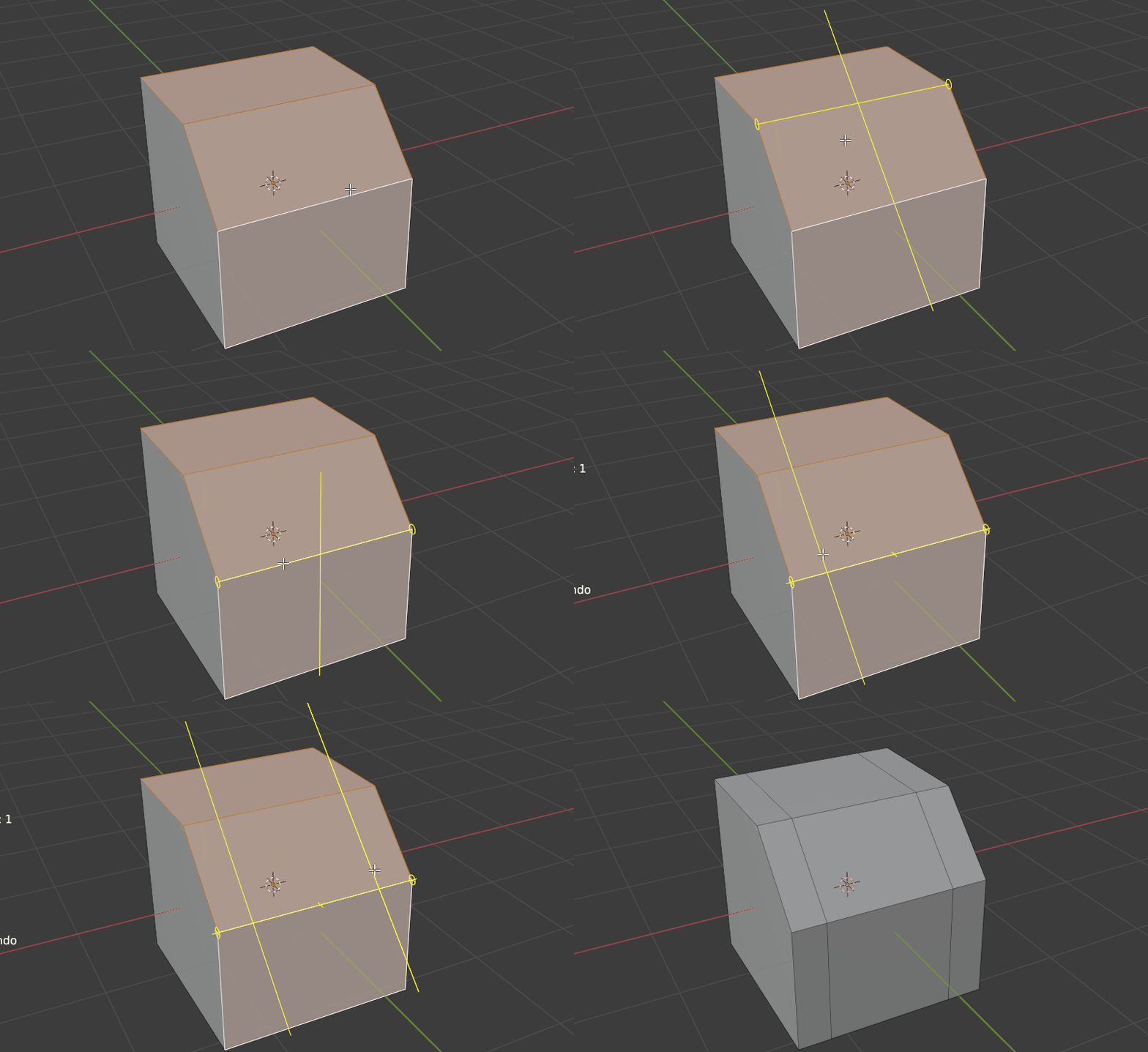
Cut + Break Apart
You can press T key to cut-through the mesh and then break apart into solid pieces.
Also you can press Shift + T to limit the cut+break only on linked geometries.
Download More For Free :
Face Cutter Demo & Download
If you are interested in downloading the Blender addons Face Cutter, it is recommended that you first watch the plugin extensive demo. We have got your back too; click the “Information” button below to try out the whole project without the hassle of downloading and installing it first. This templates may be used in many projects to test out how things appear and feel.
Blender Market – Face Cutter V1.8.0 | Size: 13.12 KB
Fast Nitroflare File-Up Prefiles Usersdrive Turbobit UploadHub UploadCloud
Disclaimer
The Face Cutter file was obtained from a free source and is not hosted on the VFXDownload website. We can safely say that Face Cutter is not our responsibility. Use this file whatever you like for your own purposes. Downloading copyrighted material is illegal, and all the files here are only for educational uses. Developers/creator/maker made it with difficulty. We request you to buy a genuine version from information button.
![SuperhiveMarket Bpdtools[V1V2] - Procedural Packaging Design Tools](https://vfxdownload.net/wp-content/uploads/2026/07/SuperhiveMarket-BpdtoolsV1V2-Procedural-Packaging-Design-Tools-350x250.jpg "SuperhiveMarket Bpdtools[V1+V2] - Procedural Packaging Design Tools")