• Home
  • DMCA
  • Contact Us
  • Advertise
Subscribe On Telegram
Chat With Us
Request Anything
Saturday, November 14, 2026
VFXDownload.Net
  • After Effects
    • After Effects Project
    • Audio Spectrum
    • Title
    • Elements
    • Openers
    • Promo
    • Video Displays
    • Music Visualizer
    • Logo Opener/String/Intro
  • Premiere Pro
    • Premiere Pro Logo
    • MOGRT
    • Premiere Pro Project
    • Title
  • Graphics & Arts
  • Sounds
  • Courses
  • Plugins & Scripts
No Result
View All Result
VFXDownload.Net
  • After Effects
    • After Effects Project
    • Audio Spectrum
    • Title
    • Elements
    • Openers
    • Promo
    • Video Displays
    • Music Visualizer
    • Logo Opener/String/Intro
  • Premiere Pro
    • Premiere Pro Logo
    • MOGRT
    • Premiere Pro Project
    • Title
  • Graphics & Arts
  • Sounds
  • Courses
  • Plugins & Scripts
No Result
View All Result
VFXDownload.Net
No Result
View All Result
Home Adobe Premiere Pro

VideoHive X-Ray Human Transitions | Premiere Pro 61752885

November 13, 2026
in Adobe Premiere Pro
0
VideoHive X-Ray Human Transitions | Premiere Pro 61752885
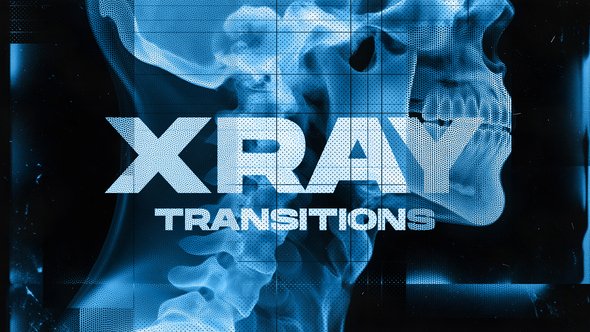
X-Ray Human Transitions is a Premiere Pro template pack with skeletal visuals, halftone textures, glitch overlays, and a blue monochrome look for sci-fi, tech, or horror edits.

Free Download X-Ray Human Transitions | Premiere Pro. For edits that need a cold, clinical edge, X-Ray Human Transitions brings a high-contrast medical imaging look to Adobe Premiere Pro.
It pairs seamless transitions with skeletal visuals, halftone textures, glitchy overlays, and grid elements.
The blue monochrome palette suits tech, horror, or science-themed projects with an edgy, experimental style.

Overview of X-Ray Human Transitions | Premiere Pro

X-Ray Human Transitions for Premiere Pro gives editors a bold, high-contrast look built around medical imaging. The pack pairs seamless transitions with skeletal visuals and halftone textures, so cuts feel sharp and slightly unsettling.
Glitchy overlays, grid elements, and a blue monochrome palette push the futuristic sci-fi tone. That mix works well for tech, horror, and science-themed content that needs an edgy, experimental style.
The template does not include photos, videos, or music. The preview uses the Background Technology font, and the font link is included. It suits Premiere Pro editors who want a clinical, high-contrast visual layer for tech, horror, or science-focused edits.

Features of X-Ray Human Transitions | Premiere Pro

  • Medical imaging inspired look with bold high contrast and a blue monochrome palette.
  • Seamless transitions layered with skeletal visuals and halftone textures.
  • Futuristic sci-fi tone built for tech, horror, and science-themed edits.
  • Glitchy overlays and grid elements give cuts an edgy, experimental finish.
  • The blue monochrome treatment keeps the X-ray theme clear across the sequence.
  • Made for Adobe Premiere Pro, so the pack fits into a standard timeline workflow.
  • Use it when a cut needs a sharper, more experimental edge.
  • Photos and videos are not included. Music is not included.
  • The preview uses a background technology font link, and that link is included.

How to use X-Ray Human Transitions | Premiere Pro

Use the template inside Adobe Premiere Pro. The product is listed under Adobe Premiere Pro and Premiere Pro Templates on vfxdownload.net.

  • 1. Open Adobe Premiere Pro and load the project where you plan to use X-Ray Human Transitions.
  • 2. Get the Premiere Pro template from vfxdownload.net and bring it into that project.
  • 3. Place the X-Ray Human Transitions template on the timeline at the point where one clip meets the next.
  • 4. Move the template so it covers the cut you want to transition.
  • 5. Play the timeline to preview the result with your own footage around it.
  • 6. Adjust the surrounding edit as needed, then export from Premiere Pro when the sequence is ready.

Preview the cut in context. That shows how the transition reads with the clips before and after it.

Download More For Free :

  • Premiere Pro Templates
  • After Effects project
  • Apple Motion Templates
  • Graphics & Vector Art
  • Free Sound Effects
  • Plugin & Script

X-Ray Human Transitions | Premiere Pro Demo and Download

Scroll to the download section on vfxdownload.net and click the download button for the X-Ray Human Transitions Premiere Pro template. The pack uses skeletal visuals, halftone textures, glitchy overlays, grid elements, and a blue monochrome palette for a medical imaging look. Confirm you are on the right template page. Then use the download button to get the files. Photos and videos are not included, and music is not included.

https://s3.envato.com/h264-video-previews/511dd483-3c41-4be4-ad42-e339f78f6f4a/61752885.mp4

VideoHive – X-Ray Human Transitions | Premiere Pro | Size: 415.06 MB

HOW TO DOWNLOAD INFORMATION

Premium Fast-Speed Links

Fast Prefiles  NitroFlare  Turbobit  RapidGator

Free Slow-Speed Links

File-Up  Usersdrive

Disclaimer

This article covers the X-Ray Human Transitions template by VideoHive. All previews, screenshots, and sample clips shown here are for educational and demonstration purposes only. They do not grant any license for commercial use. To use this Premiere Pro template in paid or client projects, purchase a licensed copy from vfxdownload.net. Availability, pricing, and licensing terms may change without notice.


Join @vfxdownloadnet on Telegram
Tags: anatomy themeblue overlaybonesDigital Distortionexperimental visualsfuturisticglitch effectglitch transitionsgrid overlayhalftonehuman anatomymedical scanmotion textureSci-fiskeletal graphicsskullspinetech aesthetictransitionsVideohive X-Ray Human Transitions | Premiere ProVideohive X-Ray Human Transitions | Premiere Pro 61752885Videohive X-Ray Human Transitions | Premiere Pro 61752885 Free DownloadVideohive X-Ray Human Transitions | Premiere Pro Free Downloadx-rayX-Ray Human Transitions | Premiere ProX-Ray Human Transitions | Premiere Pro 61752885X-Ray Human Transitions | Premiere Pro downloadX-Ray Human Transitions | Premiere Pro for Adobe Premiere Pro

Related Posts

VideoHive Retro Aged Paper Dust Overlays Premiere Pro 61704440
Adobe Premiere Pro

VideoHive Retro Aged Paper Dust Overlays Premiere Pro 61704440

November 13, 2026
VideoHive Slideshow | Photo Slideshow MOGRT 61758579
Adobe Premiere Pro

VideoHive Slideshow | Photo Slideshow MOGRT 61758579

November 13, 2026
VideoHive Light Mask Transitions for Premiere Pro 61676905
Adobe Premiere Pro

VideoHive Light Mask Transitions for Premiere Pro 61676905

November 13, 2026
VideoHive Glow Text Presets 61753028
Adobe Premiere Pro

VideoHive Glow Text Presets 61753028

November 13, 2026
VideoHive Futuristic Digital Slideshow for Premiere Pro 61673846
Adobe Premiere Pro

VideoHive Futuristic Digital Slideshow for Premiere Pro 61673846

November 13, 2026
VideoHive Abstract Color Lines Grunge Transition – Analog Color & Grunge FX Pr 61702951
Adobe Premiere Pro

VideoHive Abstract Color Lines Grunge Transition – Analog Color & Grunge FX Pr 61702951

November 13, 2026
0 0 votes
Article Rating
Subscribe
Notify of

This site uses Akismet to reduce spam. Learn how your comment data is processed.

0 Comments
Oldest
Newest Most Voted

Categories

Subscribe VFX

Join Chat Group

VFX Request Bots

Most Popular Packs!!!

How To Download Files

Free Download!!!!!!


Facebook Telegram

Pages

  • Advertise
  • Contact Us
  • DMCA
  • How To Download
  • Privacy Policy
  • Search
  • VFXDownload.Net

Top Categories

  • After Effects
  • Adobe Premiere Pro
  • Free Course
  • Motion Graphics
  • Exclusive
  • Google Drive Courses/Packs
  • Plugin & Script

Copyright © 2020-2025 VFXDownload.Net

No Result
View All Result
  • After Effects
    • After Effects Project
    • Audio Spectrum
    • Title
    • Elements
    • Openers
    • Promo
    • Video Displays
    • Music Visualizer
    • Logo Opener/String/Intro
  • Premiere Pro
    • Premiere Pro Logo
    • MOGRT
    • Premiere Pro Project
    • Title
  • Graphics & Arts
  • Sounds
  • Courses
  • Plugins & Scripts

Copyright © 2020-2025 VFXDownload.Net

wpDiscuz
0
0
Would love your thoughts, please comment.x
()
x
| Reply