• Home
  • DMCA
  • Contact Us
  • Advertise
Subscribe On Telegram
Chat With Us
Request Anything
Saturday, November 14, 2026
VFXDownload.Net
  • After Effects
    • After Effects Project
    • Audio Spectrum
    • Title
    • Elements
    • Openers
    • Promo
    • Video Displays
    • Music Visualizer
    • Logo Opener/String/Intro
  • Premiere Pro
    • Premiere Pro Logo
    • MOGRT
    • Premiere Pro Project
    • Title
  • Graphics & Arts
  • Sounds
  • Courses
  • Plugins & Scripts
No Result
View All Result
VFXDownload.Net
  • After Effects
    • After Effects Project
    • Audio Spectrum
    • Title
    • Elements
    • Openers
    • Promo
    • Video Displays
    • Music Visualizer
    • Logo Opener/String/Intro
  • Premiere Pro
    • Premiere Pro Logo
    • MOGRT
    • Premiere Pro Project
    • Title
  • Graphics & Arts
  • Sounds
  • Courses
  • Plugins & Scripts
No Result
View All Result
VFXDownload.Net
No Result
View All Result
Home Adobe Premiere Pro

VideoHive Light Mask Transitions for Premiere Pro 61676905

November 13, 2026
in Adobe Premiere Pro
0
VideoHive Light Mask Transitions for Premiere Pro 61676905
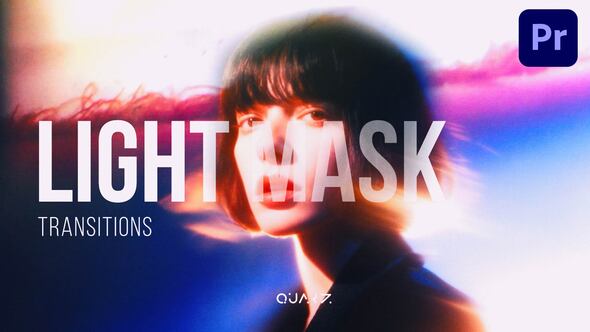
Light Mask Transitions for Premiere Pro is a ready-to-use transitions pack for photo and video, requiring no plugins and working on Premiere Pro 2025 and higher.

Free Download Light Mask Transitions for Premiere Pro. This ready to use, fully handcrafted transition pack gives Adobe Premiere Pro editors a fast way to add a light mask effect to video and photo projects, with no plugins required.
Built for Premiere Pro 2025 and higher, it works with any FPS and resolution, stays easy to apply, and includes a detailed video tutorial, future updates, and support from Quarz.

Overview of Light Mask Transitions for Premiere Pro

Light Mask Transitions for Premiere Pro provides ready-to-use transitions for photos and video. No plugins are required, and it supports Premiere Pro 2025 and higher. The set works with any FPS and resolution, so it fits different project settings without extra setup.
The workflow is easy to use. Every transition is fully handcrafted with no AI used. The price includes the transitions package, online support, a detailed video tutorial, future updates, and a customization service.
Use it to save time while editing and add a polished professional look to your video. The package is a high-quality product built for practical editing work.

Features of Light Mask Transitions for Premiere Pro

  • Built for Adobe Premiere Pro 2025 and higher, so the transitions work inside your existing editing workflow.
  • No plugins required. You add them without extra installations or third-party tools.
  • Works with both photo and video projects.
  • Supports any FPS and resolution, which keeps the set flexible across timelines and delivery formats.
  • Easy to use and ready to apply, helping you save editing time while adding a professional touch to your video.
  • Fully handcrafted with no AI used.
  • High-quality product with a detailed video tutorial included.
  • The price includes the transitions package itself, online support, future updates, and a customization service.

How to use Light Mask Transitions for Premiere Pro

  • Open Adobe Premiere Pro and load the project file included with the template.
  • Import your footage and drop the two clips you want to connect onto the timeline.
  • Keep both clips on the same sequence without overlapping them, so the transition has a clean cut to work with.
  • Find the Light Mask Transitions items in the project panel.
  • Drag the transition you like onto the cut between the clips.
  • Trim the edges of the transition to set how long the light mask sweep lasts.
  • Scrub the playhead to preview the result.
  • Check that the light pass sits over the frame area you care about most.
  • Nudge the transition left or right along the edit point if the timing feels off.
  • Repeat the steps for each additional cut.
  • Preview the full sequence, then export your video as usual.

Download More For Free :

  • Premiere Pro Templates
  • After Effects project
  • Apple Motion Templates
  • Graphics & Vector Art
  • Free Sound Effects
  • Plugin & Script

Light Mask Transitions for Premiere Pro Demo and Download

To download Light Mask Transitions for Premiere Pro from vfxdownload.net, scroll to the download section and click the download button. This Quarz template needs no plugins and runs on Premiere Pro 2025 and higher. It works with photo and video at any FPS and resolution. A detailed video tutorial is included. The package includes ready to use transitions, and it is fully handcrafted with no AI used.

https://s3.envato.com/h264-video-previews/da658fae-c694-4f93-86c7-d2b9fa4e3b94/61676905.mp4

VideoHive – Light Mask Transitions for Premiere Pro | Size: 58.45 MB

HOW TO DOWNLOAD INFORMATION

Premium Fast-Speed Links

Fast Prefiles  NitroFlare  Turbobit  RapidGator

Free Slow-Speed Links

File-Up  Usersdrive

Disclaimer

The Light Mask Transitions for Premiere Pro template by VideoHive is provided here for reference and demonstration. Demo content is intended for educational use only. It does not grant commercial rights. If you plan to use the template in paid projects, client work, or any commercial production, you must purchase it from vfxdownload.net. Review the seller’s terms before use.

Join @vfxdownloadnet on Telegram
Tags: cinematic editCinematic Transitionclean transitioncreative transitiondynamic motionfilm effectforeground revealglow maskLight LeakLight Leak Transitionlight mask transitionLight Mask Transitions for Premiere ProLight Mask Transitions for Premiere Pro 61676905Light Mask Transitions for Premiere Pro downloadLight Mask Transitions for Premiere Pro for Adobe Premiere ProLight Reveallight reveal transitionmask revealmask transitionmodern editMotion Graphicsmotion transitionNo Plugin Transitionsoptical maskorganic lightpremiere pro transitionsprofessional transitionpromo videoreels transitionreveal through lightreveal transitionseamless transitionsmooth motionsmooth transitionsocial media videosoft lightsubject revealtiktok transitiontransition toolkittrending transitionsvideo transitionVideo Transition PackVideohive Light Mask Transitions for Premiere ProVideohive Light Mask Transitions for Premiere Pro 61676905Videohive Light Mask Transitions for Premiere Pro 61676905 Free DownloadVideohive Light Mask Transitions for Premiere Pro Free Downloadvisual effectyoutube video

Related Posts

VideoHive X-Ray Human Transitions | Premiere Pro 61752885
Adobe Premiere Pro

VideoHive X-Ray Human Transitions | Premiere Pro 61752885

November 13, 2026
VideoHive Retro Aged Paper Dust Overlays Premiere Pro 61704440
Adobe Premiere Pro

VideoHive Retro Aged Paper Dust Overlays Premiere Pro 61704440

November 13, 2026
VideoHive Slideshow | Photo Slideshow MOGRT 61758579
Adobe Premiere Pro

VideoHive Slideshow | Photo Slideshow MOGRT 61758579

November 13, 2026
VideoHive Glow Text Presets 61753028
Adobe Premiere Pro

VideoHive Glow Text Presets 61753028

November 13, 2026
VideoHive Futuristic Digital Slideshow for Premiere Pro 61673846
Adobe Premiere Pro

VideoHive Futuristic Digital Slideshow for Premiere Pro 61673846

November 13, 2026
VideoHive Abstract Color Lines Grunge Transition – Analog Color & Grunge FX Pr 61702951
Adobe Premiere Pro

VideoHive Abstract Color Lines Grunge Transition – Analog Color & Grunge FX Pr 61702951

November 13, 2026
0 0 votes
Article Rating
Subscribe
Notify of

This site uses Akismet to reduce spam. Learn how your comment data is processed.

0 Comments
Oldest
Newest Most Voted

Categories

Subscribe VFX

Join Chat Group

VFX Request Bots

Most Popular Packs!!!

How To Download Files

Free Download!!!!!!


Facebook Telegram

Pages

  • Advertise
  • Contact Us
  • DMCA
  • How To Download
  • Privacy Policy
  • Search
  • VFXDownload.Net

Top Categories

  • After Effects
  • Adobe Premiere Pro
  • Free Course
  • Motion Graphics
  • Exclusive
  • Google Drive Courses/Packs
  • Plugin & Script

Copyright © 2020-2025 VFXDownload.Net

No Result
View All Result
  • After Effects
    • After Effects Project
    • Audio Spectrum
    • Title
    • Elements
    • Openers
    • Promo
    • Video Displays
    • Music Visualizer
    • Logo Opener/String/Intro
  • Premiere Pro
    • Premiere Pro Logo
    • MOGRT
    • Premiere Pro Project
    • Title
  • Graphics & Arts
  • Sounds
  • Courses
  • Plugins & Scripts

Copyright © 2020-2025 VFXDownload.Net

wpDiscuz
0
0
Would love your thoughts, please comment.x
()
x
| Reply