



• Home
  • DMCA
  • Contact Us
  • Advertise
Subscribe On Telegram
Chat With Us
Request Anything
Tuesday, April 28, 2026
VFXDownload.Net
  • After Effects
    • After Effects Project
    • Audio Spectrum
    • Title
    • Elements
    • Openers
    • Promo
    • Video Displays
    • Music Visualizer
    • Logo Opener/String/Intro
  • Premiere Pro
    • Premiere Pro Logo
    • MOGRT
    • Premiere Pro Project
    • Title
  • Graphics & Arts
  • Sounds
  • Courses
  • Plugins & Scripts
No Result
View All Result
VFXDownload.Net
  • After Effects
    • After Effects Project
    • Audio Spectrum
    • Title
    • Elements
    • Openers
    • Promo
    • Video Displays
    • Music Visualizer
    • Logo Opener/String/Intro
  • Premiere Pro
    • Premiere Pro Logo
    • MOGRT
    • Premiere Pro Project
    • Title
  • Graphics & Arts
  • Sounds
  • Courses
  • Plugins & Scripts
No Result
View All Result
VFXDownload.Net
No Result
View All Result
Home Adobe Premiere Pro

VideoHive Vertical Film Presets Pack for Premiere Pro 59568436

September 3, 2025
in Adobe Premiere Pro
0
VideoHive Vertical Film Presets Pack for Premiere Pro 59568436

RelatedPosts

VideoHive Telegram Chat Message UI 61380150

VideoHive Telegram Chat Message UI 61380150

February 1, 2026
VideoHive Short Action Trailer 61396953

VideoHive Short Action Trailer 61396953

February 1, 2026
Vertical Film Presets Pack for Premiere Pro offers high-quality effects and transitions—just import the project, use in one click, no plugins required. Supports all resolutions.

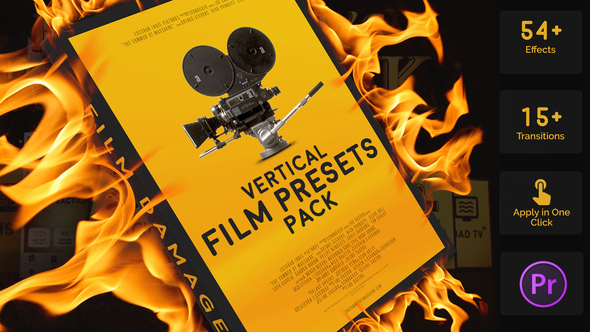
Free Download Vertical Film Presets Pack for Premiere Pro. The Vertical Film Presets Pack for Adobe Premiere Pro offers filmmakers a streamlined editing experience with 54 Film Damage presets and 15 transitions. Import the project, enjoy one-click effects, and support any resolution effortlessly. No plugins required, just drag and drop for seamless integration in your sequence. Available on platforms like VideoHive, these presets are compatible with Premiere Pro 2018 and above, ensuring you achieve professional-grade results with ease.

Overview of Vertical Film Presets Pack for Premiere Pro

The Vertical Film Presets Pack for Premiere Pro offers an impressive suite of 54 Film Damage presets and 15 transitions to enrich your video projects. Simply import the “Film” project to access these stunning effects with just one click. Users can enjoy a hassle-free, plugin-free experience with full support for Premiere Pro 2018 and above. The pack is fully resizable, allowing for versatile use across any resolution. Drag-and-drop functionality ensures precise and seamless integration with your sequences, making video editing swift and effortless. Perfectly adjust your project settings for a customized fit.

Features of Vertical Film Presets Pack for Premiere Pro

  • 54 Film Damage Presets: Add an authentic, vintage feel to your footage.
  • 15 Film Damage Transitions: Seamlessly integrate transitions with precision.
  • No Plugins Required: Enjoy hassle-free installation and compatibility.
  • Adobe Premiere Pro 2018 and Above: Fully compatible with the latest versions.
  • Fully Resizable: Supports any resolution to fit your project needs.
  • Easy to Use: Drag and drop for swift editing.
  • Instant Preview: Quickly view effects before applying.
  • Simple Integration: Right-click to change resolution and settings effortlessly.
  • Optimized for Performance: Smooth playback without lags or glitches.

How to use Vertical Film Presets Pack for Premiere Pro

1. Open Adobe Premiere Pro and create a new project.

2. Import the Vertical Film Presets Pack by clicking File, then Import. Select the “Film” project file.

3. Drag and drop the film presets into your timeline. Make sure the transition cuts precisely match the clips’ cut points.

4. To apply effects, choose the desired preset from the pack and drag it onto your clips.

5. For resolution adjustments, locate the “change resolution” folder. Right-click the composition, then select Sequence Settings. Enter your preferred resolution and frame rate.

6. Preview changes instantly to see the effects in action.

7. Export your project when satisfied with the results. Go to File and click on Export.

8. Save your work frequently to avoid data loss.

This method ensures seamless integration of stunning film effects without plugins.

Download More For Free :

  • Premiere Pro Templates
  • After Effects project
  • Apple Motion Templates
  • Graphics & Vector Art
  • Free Sound Effects
  • Plugin & Script

Vertical Film Presets Pack for Premiere Pro Demo and Download

To download the Vertical Film Presets Pack for Premiere Pro, visit vfxdownload.net. Scroll to the download section and click the download button. Ensure a reliable internet connection for quick access to this valuable resource.

https://s3.envato.com/h264-video-previews/1ac36657-0bdf-46de-bdef-da0bb9fea1fd/59568436.mp4

VideoHive – Vertical Film Presets Pack for Premiere Pro | Size: 1.7 GB

HOW TO DOWNLOAD INFORMATION

Premium Fast-Speed Links

Fast Prefiles  NitroFlare  Turbobit  RapidGator

Free Slow-Speed Links

File-Up  Usersdrive

Disclaimer

The Vertical Film Presets Pack from VideoHive is available on vfxdownload.net for educational purposes only. To use this pack commercially, you must purchase a license directly from VideoHive. Unauthorized commercial use may violate copyright laws. Always ensure compliance by obtaining the appropriate permissions.


Join @vfxdownloadnet on Telegram
Tags: 20s40'sbnwcameradamagedirtyDistortiondustDynamicFilmFilm TransitionsflickerGlitchgrainhairIntroiphoneMovienoiseoldOpenerphonePromoreelsRetrosepiaSlideStoriesStylishtiktoktransitionsverticalVertical Film Presets Pack for Premiere ProVertical Film Presets Pack for Premiere Pro 59568436Vertical Film Presets Pack for Premiere Pro downloadVertical Film Presets Pack for Premiere Pro for Adobe Premiere ProvhsVideohive Vertical Film Presets Pack for Premiere ProVideohive Vertical Film Presets Pack for Premiere Pro 59568436Videohive Vertical Film Presets Pack for Premiere Pro 59568436 Free DownloadVideohive Vertical Film Presets Pack for Premiere Pro Free DownloadvignetteVintage

Related Posts

VideoHive Telegram Chat Message UI 61380150
Adobe Premiere Pro

VideoHive Telegram Chat Message UI 61380150

February 1, 2026
VideoHive Short Action Trailer 61396953
Adobe Premiere Pro

VideoHive Short Action Trailer 61396953

February 1, 2026
VideoHive Reflective Gradient Toolkit | Luxury Motion Backgrounds for After Effects & Premiere Pro 61451814
Adobe Premiere Pro

VideoHive Reflective Gradient Toolkit | Luxury Motion Backgrounds for After Effects & Premiere Pro 61451814

February 1, 2026
VideoHive News Intro 61397109
Adobe Premiere Pro

VideoHive News Intro 61397109

February 1, 2026
VideoHive Music Player App Screens 61435884
Adobe Premiere Pro

VideoHive Music Player App Screens 61435884

February 1, 2026
VideoHive Luxury Gradient Toolkit | Premium Motion Backgrounds for After Effects & Premiere Pro 61435935
Adobe Premiere Pro

VideoHive Luxury Gradient Toolkit | Premium Motion Backgrounds for After Effects & Premiere Pro 61435935

February 1, 2026
0 0 votes
Article Rating
Subscribe
Notify of

This site uses Akismet to reduce spam. Learn how your comment data is processed.

0 Comments
Oldest
Newest Most Voted
Inline Feedbacks
View all comments

Categories

Subscribe VFX

Join Chat Group

VFX Request Bots

Most Popular Packs!!!

How To Download Files

Free Download!!!!!!


Facebook Telegram

Pages

  • Advertise
  • Contact Us
  • DMCA
  • How To Download
  • Privacy Policy
  • Search
  • VFXDownload.Net

Top Categories

  • After Effects
  • Adobe Premiere Pro
  • Free Course
  • Motion Graphics
  • Exclusive
  • Google Drive Courses/Packs
  • Plugin & Script

Copyright © 2020-2025 VFXDownload.Net

No Result
View All Result
  • After Effects
    • After Effects Project
    • Audio Spectrum
    • Title
    • Elements
    • Openers
    • Promo
    • Video Displays
    • Music Visualizer
    • Logo Opener/String/Intro
  • Premiere Pro
    • Premiere Pro Logo
    • MOGRT
    • Premiere Pro Project
    • Title
  • Graphics & Arts
  • Sounds
  • Courses
  • Plugins & Scripts

Copyright © 2020-2025 VFXDownload.Net

wpDiscuz
0
0
Would love your thoughts, please comment.x
()
x
| Reply
















