



• Home
  • DMCA
  • Contact Us
  • Advertise
Subscribe On Telegram
Chat With Us
Request Anything
Saturday, January 24, 2026
VFXDownload.Net
  • After Effects
    • After Effects Project
    • Audio Spectrum
    • Title
    • Elements
    • Openers
    • Promo
    • Video Displays
    • Music Visualizer
    • Logo Opener/String/Intro
  • Premiere Pro
    • Premiere Pro Logo
    • MOGRT
    • Premiere Pro Project
    • Title
  • Graphics & Arts
  • Sounds
  • Courses
  • Plugins & Scripts
No Result
View All Result
VFXDownload.Net
  • After Effects
    • After Effects Project
    • Audio Spectrum
    • Title
    • Elements
    • Openers
    • Promo
    • Video Displays
    • Music Visualizer
    • Logo Opener/String/Intro
  • Premiere Pro
    • Premiere Pro Logo
    • MOGRT
    • Premiere Pro Project
    • Title
  • Graphics & Arts
  • Sounds
  • Courses
  • Plugins & Scripts
No Result
View All Result
VFXDownload.Net
No Result
View All Result
Home After Effects Elements

VideoHive MaskFlash Transitions for After Effects 60922851

January 20, 2026
in Elements, After Effects
0
VideoHive MaskFlash Transitions for After Effects 60922851

RelatedPosts

VideoHive Brush Transition 61322139

VideoHive Brush Transition 61322139

January 22, 2026
VideoHive Clean Blinds Transition 61338686

VideoHive Clean Blinds Transition 61338686

January 22, 2026
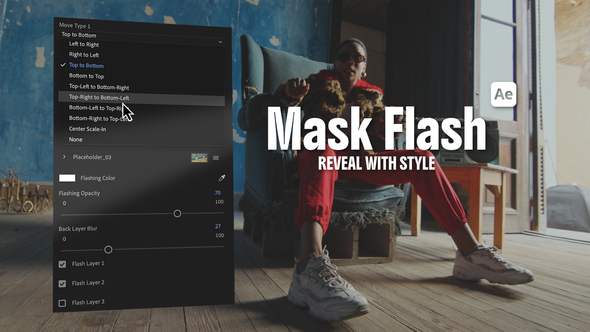
MaskFlash Transitions for After Effects offer dynamic mask-driven reveals with customizable cutout masks. Ideal for energetic edits, it’s easy to use for both beginners and pros.

Free Download MaskFlash Transitions for After Effects. MaskFlash Transitions for After Effects offer a dynamic mask-driven reveal style, perfect for creating energetic flow and depth in your videos. Utilizing up to three custom cutout masks, these transitions place your main subject above the outgoing shot. Users can choose from multiple directional variations and add a strobe-color flash for extra impact. Ideal for travel, lifestyle, and fast-paced edits, this tool suits both beginners and advanced editors with its easy setup and fast rendering.

Overview of MaskFlash Transitions for After Effects

MaskFlash Transitions for After Effects provide a dynamic mask-driven reveal style, making your edits visually striking. Each transition uses up to three custom cutout masks to place your primary subject above the outgoing layer with a fast, directional movement. The underlying clip includes a soft blur effect, adding depth and focus. Select from left, right, top, bottom, and diagonal variations through a simple drop-down menu. You can also use a slider to introduce an optional strobe-color flash on the final frames for a dramatic touch. Suitable for travel, lifestyle, sports, urban, and fashion edits, this tool offers an easy drag-and-drop workflow, ideal for both beginners and advanced users. Enjoy fast rendering and subtle color controls for seamless integration into any project.

Features of MaskFlash Transitions for After Effects

  • Dynamic mask-driven reveal style using up to three custom cutout masks for impactful transitions.
  • Integrates seamlessly with After Effects and Premiere Pro through a MOGRT-friendly workflow.
  • Offers directional movement options: left, right, top, bottom, and diagonal variations.
  • Includes a soft blur effect on the outgoing media to enhance depth and focus.
  • Features an optional strobe-color flash via a dedicated slider for visual impact.
  • Easy drag-and-drop workflow with quick customization, suitable for beginners and experts alike.
  • Fast rendering with color controls, making it perfect for fast-paced edits and high-energy projects.

How to use MaskFlash Transitions for After Effects

1. Open After Effects and create a new composition matching your project settings.
2. Import the MaskFlash Transitions template into your project panel.
3. Drag the desired transition into your timeline, placing it between two clips.
4. Select the transition layer and open the effects panel.
5. Choose up to three cutout masks from your media for your transition.
6. Adjust the directional movement by selecting options like left, right, top, bottom, or diagonal.
7. Use the slider to add a strobe-color flash if desired for an extra visual effect.
8. Fine-tune the soft blur effect on the outgoing media to achieve the depth you want.
9. Preview your composition to ensure the transition flows smoothly.
10. Render your final project, enjoying a seamless and dynamic transition.

With these steps, you’ll have a smooth editing process using the MaskFlash Transitions in After Effects.

Download More For Free :

  • Premiere Pro Templates
  • After Effects project
  • Apple Motion Templates
  • Graphics & Vector Art
  • Free Sound Effects
  • Plugin & Script

MaskFlash Transitions for After Effects Demo and Download

Head over to vfxdownload.net and find the MaskFlash Transitions for After Effects template. Scroll to the download section, then click the download button to get the file. Enjoy creating stunning transitions with ease!

https://s3.envato.com/h264-video-previews/aedbc4bf-d73c-45c3-a68f-2d047c77b1bc/60922851.mp4

VideoHive – MaskFlash Transitions for After Effects | Size: 72.5 MB

HOW TO DOWNLOAD INFORMATION

Premium Fast-Speed Links

Fast Prefiles  NitroFlare  Turbobit  RapidGator

Free Slow-Speed Links

File-Up  Usersdrive

Disclaimer

The demo content for MaskFlash Transitions for After Effects is provided by vfxdownload.net for educational use only. For commercial use, please purchase a valid license directly from VideoHive. Unauthorized commercial usage may violate licensing agreements.


Join @vfxdownloadnet on Telegram
Tags: animationblurbroadcastCinematicclipscollagecolorCreativecutcutoutdesigndiagonaldirectionDynamicediteditingeffectEnergeticFashionFastflashhorizontalImpactmaskMaskFlash Transitions for After EffectsMaskFlash Transitions for After Effects 60922851MaskFlash Transitions for After Effects downloadMaskFlash Transitions for After Effects for After EffectsmaskingmediaModernmotionmoveOpeneroverlayPromoRevealsequenceshapeshiftSlideSlideshowSmoothSportsstrobeStylishswipeTemplatetransitiontransitionsTravelUrbanverticalVideohive MaskFlash Transitions for After EffectsVideohive MaskFlash Transitions for After Effects 60922851Videohive MaskFlash Transitions for After Effects 60922851 Free DownloadVideohive MaskFlash Transitions for After Effects Free Downloadyoutube

Related Posts

VideoHive Brush Transition 61322139
Elements

VideoHive Brush Transition 61322139

January 22, 2026
VideoHive Clean Blinds Transition 61338686
Elements

VideoHive Clean Blinds Transition 61338686

January 22, 2026
VideoHive Vintage 8mm Overlay Effect 61399358
Elements

VideoHive Vintage 8mm Overlay Effect 61399358

January 20, 2026
VideoHive Particle Logo Reveal for After Effects 61215368
Logo Opener/String/Intro

VideoHive Particle Logo Reveal for After Effects 61215368

January 20, 2026
VideoHive Grunge Soft Textures Transitions 61383384
Elements

VideoHive Grunge Soft Textures Transitions 61383384

January 20, 2026
VideoHive History Slideshow 61247270
Video Displays

VideoHive History Slideshow 61247270

January 20, 2026

Categories

Subscribe VFX

Join Chat Group

VFX Request Bots

Most Popular Packs!!!

How To Download Files

Free Download!!!!!!


Facebook Telegram

Pages

  • Advertise
  • Contact Us
  • DMCA
  • How To Download
  • Privacy Policy
  • Search
  • VFXDownload.Net

Top Categories

  • After Effects
  • Adobe Premiere Pro
  • Free Course
  • Motion Graphics
  • Exclusive
  • Google Drive Courses/Packs
  • Plugin & Script

Copyright © 2020-2025 VFXDownload.Net

No Result
View All Result
  • After Effects
    • After Effects Project
    • Audio Spectrum
    • Title
    • Elements
    • Openers
    • Promo
    • Video Displays
    • Music Visualizer
    • Logo Opener/String/Intro
  • Premiere Pro
    • Premiere Pro Logo
    • MOGRT
    • Premiere Pro Project
    • Title
  • Graphics & Arts
  • Sounds
  • Courses
  • Plugins & Scripts

Copyright © 2020-2025 VFXDownload.Net
















