


• Home
  • DMCA
  • Contact Us
  • Advertise
Subscribe On Telegram
Chat With Us
Request Anything
Friday, December 26, 2025
VFXDownload.Net
  • After Effects
    • After Effects Project
    • Audio Spectrum
    • Title
    • Elements
    • Openers
    • Promo
    • Video Displays
    • Music Visualizer
    • Logo Opener/String/Intro
  • Premiere Pro
    • Premiere Pro Logo
    • MOGRT
    • Premiere Pro Project
    • Title
  • Graphics & Arts
  • Sounds
  • Courses
  • Plugins & Scripts
No Result
View All Result
VFXDownload.Net
  • After Effects
    • After Effects Project
    • Audio Spectrum
    • Title
    • Elements
    • Openers
    • Promo
    • Video Displays
    • Music Visualizer
    • Logo Opener/String/Intro
  • Premiere Pro
    • Premiere Pro Logo
    • MOGRT
    • Premiere Pro Project
    • Title
  • Graphics & Arts
  • Sounds
  • Courses
  • Plugins & Scripts
No Result
View All Result
VFXDownload.Net
No Result
View All Result
Home DaVinci Resolve

VideoHive Countdown Timer | DR Macro 59448842

September 4, 2025
in DaVinci Resolve
0
VideoHive Countdown Timer | DR Macro 59448842

RelatedPosts

VideoHive Vintage Stretch Frame Transition Pack DaVinci Resolve 61094857

VideoHive Vintage Stretch Frame Transition Pack DaVinci Resolve 61094857

December 24, 2025
VideoHive Prism Light Leaks Transitions | DR 61125231

VideoHive Prism Light Leaks Transitions | DR 61125231

December 24, 2025
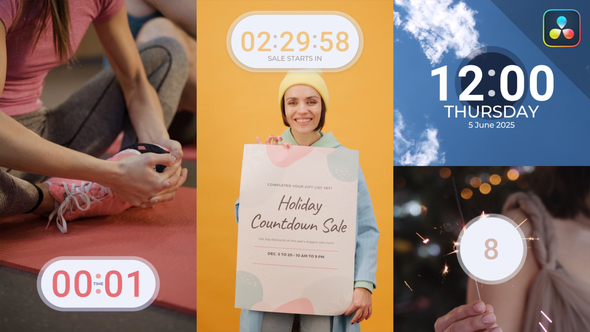
The Countdown Timer is a customizable DaVinci Resolve macro with clean designs for sports, fitness, and event videos, featuring easy text and color adjustments.

Free Download Countdown Timer | DR Macro. The Countdown Timer from Biofunk on VideoHive offers a sleek and customizable DaVinci Resolve macro. It features a timer widget, digital clock, and countdown number. Users can easily adjust text placeholders, colors, and parameters to fit sports, fitness, corporate, and event videos. Perfect for both Full HD and 4K projects, this tool enhances video presentations without needing plugins. Enjoy included tutorials and free updates.

Overview of Countdown Timer | DR Macro

The Countdown Timer for DaVinci Resolve offers a clean and minimal design with a timer widget, digital clock, and countdown number. Users can easily customize text, colors, and other parameters, making it suitable for sports, fitness, yoga, corporate, and promotional videos.

Supporting both Full HD and 4K resolutions, it comes with video tutorials and free updates, ensuring a user-friendly experience without requiring plugins. The inclusion of in & out animations and free fonts further enhances its appeal, making it a valuable addition to any video project.

Features of Countdown Timer | DR Macro

  • Integrates seamlessly with DaVinci Resolve for smooth video editing workflows.
  • Includes a timer widget, digital clock, and countdown number for versatile usage.
  • Customizable text placeholders and color options to fit diverse project requirements.
  • Ideal for sport, fitness, yoga, corporate, and promotional videos.
  • Supports both Full HD and 4K resolutions for high-quality output.
  • Provides video tutorials for easy learning and integration.
  • Features in & out animations and includes free fonts for added creativity.
  • Operates without plugins, simplifying installation and use.
  • Offers free updates for continued performance and feature enhancements.

How to use Countdown Timer | DR Macro

1. Open DaVinci Resolve and create a new project. Import your footage into the timeline.

2. Download and install the Countdown Timer macro. Locate it in your DaVinci Resolve effects library.

3. Drag and drop the Countdown Timer effect onto your video track.

4. Click the effect in the timeline to open the inspector panel. Here, you can customize text, colors, and fonts to suit your video.

5. Adjust the in and out animations by setting keyframes to create smooth transitions.

6. Preview the changes by playing back the timeline. Make adjustments as needed for timing and appearance.

7. Once satisfied, render the project in Full HD or 4K as required for your final output.

8. Save your project files to ensure you have the customized macro settings for future use.

These steps allow you to effectively integrate and customize the Countdown Timer within your project.

Download More For Free :

  • Premiere Pro Templates
  • After Effects project
  • Apple Motion Templates
  • Graphics & Vector Art
  • Free Sound Effects
  • Plugin & Script

Countdown Timer | DR Macro Demo and Download

Visit vfxdownload.net and search for the Countdown Timer | DR Macro. Scroll to the download section and click the download button. Save the file to your computer and follow any additional instructions provided for installation. Enjoy easy integration and customization for your DaVinci Resolve projects.

https://s3.envato.com/h264-video-previews/8a4597ac-a8f4-4a87-b1e2-c0acd4ad5819/59448842.mp4

VideoHive – Countdown Timer | DR Macro | Size: 8.3 MB

HOW TO DOWNLOAD INFORMATION

Premium Fast-Speed Links

Fast Prefiles  NitroFlare  Turbobit  RapidGator

Free Slow-Speed Links

File-Up  Usersdrive

Disclaimer

The Countdown Timer | DR Macro from VideoHive is provided by vfxdownload.net for educational use only. Commercial use requires an official purchase from VideoHive. This ensures compliance with licensing terms and supports continued development.

Join @vfxdownloadnet on Telegram
Tags: alarmblack fridaycalendarcleanclockclock timerComing SooncountCountdowncountdown timerCountdown Timer | DR MacroCountdown Timer | DR Macro 59448842Countdown Timer | DR Macro downloadCountdown Timer | DR Macro for DaVinci ResolvecounterdatadaysdeadlineDigitaldigital clockdigital timerdowntimedurationElementsEventforwardhourshudintervalminimalNewsnumbersreminderreplayschedulerscoresecondsecondsShowsmart watchspeedspeedometerstopstopwatchtickerTimetime countdowntimerVideohive Countdown Timer | DR MacroVideohive Countdown Timer | DR Macro 59448842Videohive Countdown Timer | DR Macro 59448842 Free DownloadVideohive Countdown Timer | DR Macro Free Downloadwatchwatch timepiecewidget

Related Posts

VideoHive Vintage Stretch Frame Transition Pack DaVinci Resolve 61094857
DaVinci Resolve

VideoHive Vintage Stretch Frame Transition Pack DaVinci Resolve 61094857

December 24, 2025
VideoHive Prism Light Leaks Transitions | DR 61125231
DaVinci Resolve

VideoHive Prism Light Leaks Transitions | DR 61125231

December 24, 2025
VideoHive Paper Surface Dust & Scratches FX Overlays Pack DaVinci Resolve 61091919
DaVinci Resolve

VideoHive Paper Surface Dust & Scratches FX Overlays Pack DaVinci Resolve 61091919

December 24, 2025
VideoHive Mix Intro Vlog 61102767
DaVinci Resolve

VideoHive Mix Intro Vlog 61102767

December 24, 2025
VideoHive Glass Shatter Transitions 61125656
DaVinci Resolve

VideoHive Glass Shatter Transitions 61125656

December 24, 2025
VideoHive Dynamic Event 61099237
DaVinci Resolve

VideoHive Dynamic Event 61099237

December 24, 2025

Categories

Subscribe VFX

Join Chat Group

VFX Request Bots

Most Popular Packs!!!

How To Download Files

Free Download!!!!!!


Facebook Telegram

Pages

  • Advertise
  • Contact Us
  • DMCA
  • How To Download
  • Privacy Policy
  • Search
  • VFXDownload.Net

Top Categories

  • After Effects
  • Adobe Premiere Pro
  • Free Course
  • Motion Graphics
  • Exclusive
  • Google Drive Courses/Packs
  • Plugin & Script

Copyright © 2020-2025 VFXDownload.Net

No Result
View All Result
  • After Effects
    • After Effects Project
    • Audio Spectrum
    • Title
    • Elements
    • Openers
    • Promo
    • Video Displays
    • Music Visualizer
    • Logo Opener/String/Intro
  • Premiere Pro
    • Premiere Pro Logo
    • MOGRT
    • Premiere Pro Project
    • Title
  • Graphics & Arts
  • Sounds
  • Courses
  • Plugins & Scripts

Copyright © 2020-2025 VFXDownload.Net