



• Home
  • DMCA
  • Contact Us
  • Advertise
Subscribe On Telegram
Chat With Us
Request Anything
Sunday, December 28, 2025
VFXDownload.Net
  • After Effects
    • After Effects Project
    • Audio Spectrum
    • Title
    • Elements
    • Openers
    • Promo
    • Video Displays
    • Music Visualizer
    • Logo Opener/String/Intro
  • Premiere Pro
    • Premiere Pro Logo
    • MOGRT
    • Premiere Pro Project
    • Title
  • Graphics & Arts
  • Sounds
  • Courses
  • Plugins & Scripts
No Result
View All Result
VFXDownload.Net
  • After Effects
    • After Effects Project
    • Audio Spectrum
    • Title
    • Elements
    • Openers
    • Promo
    • Video Displays
    • Music Visualizer
    • Logo Opener/String/Intro
  • Premiere Pro
    • Premiere Pro Logo
    • MOGRT
    • Premiere Pro Project
    • Title
  • Graphics & Arts
  • Sounds
  • Courses
  • Plugins & Scripts
No Result
View All Result
VFXDownload.Net
No Result
View All Result
Home After Effects Openers

VideoHive 3D Particles Logo Explosion 1491975

October 15, 2025
in Openers, After Effects
0
VideoHive 3D Particles Logo Explosion 1491975

RelatedPosts

VideoHive Happy New Year 2026 61228463

VideoHive Happy New Year 2026 61228463

December 27, 2025
VideoHive Flying Slideshow || Photo Slideshow 61119613

VideoHive Flying Slideshow || Photo Slideshow 61119613

December 27, 2025
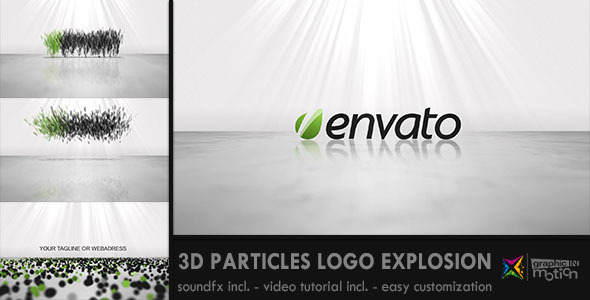
Create a dynamic logo intro with 3D particles explosion. Requires Trapcode Particular. Includes customization, HD resolution, sound effects, and a video tutorial for easy setup.

Free Download 3D Particles Logo Explosion. Explode your logo into a burst of colorful particles with this dynamic intro template for After Effects. Designed for ease, this template requires Trapcode Particular for stunning visuals. You’ll find it easy to customize with included sound effects and a helpful video tutorial. Contact graphicINmotion for customization support or visit VideoHive for more resources.

Overview of 3D Particles Logo Explosion

The 3D Particles Logo Explosion template brings your logo to life by exploding it into colorful, bouncing particles. This short, clean, and simple intro requires Trapcode Particular for high-quality effects and delivers in Full HD resolution. Included sound effects add dynamic elements such as swishes, explosions, and zings, enhancing the visual impact.

Customization is straightforward with a detailed video tutorial, ensuring everything can be easily adjusted to suit your brand. For further assistance, contact graphicINmotion. Visit their website for more templates and design elements to elevate your projects.

Features of 3D Particles Logo Explosion

  • Transforms your logo into a burst of colorful, bouncing particles for a dynamic intro effect.
  • Seamlessly integrates with After Effects, utilizing Trapcode Particular for outstanding visual quality.
  • Features Full HD resolution ensuring crisp and clear presentation.
  • Includes sound effects such as swishes, explosions, and falling particles to enhance your project.
  • Offers a comprehensive video tutorial for easy customization and implementation.
  • Flexible and customizable to suit individual branding needs.
  • Customization services are available through graphicINmotion for personalized assistance.
  • Visit their website for additional templates and motion design elements.

How to use 3D Particles Logo Explosion

1. Open After Effects and create a new project.

2. Import the 3D Particles Logo Explosion template.

3. Ensure Trapcode Particular is installed. You can download it from the Red Giant website.

4. Open the template composition. Locate your logo placeholder.

5. Drag and drop your logo into the placeholder layer.

6. Adjust the size and position of your logo to fit the scene.

7. Customize the particle settings if desired. Follow the included video tutorial for guidance.

8. Check the sound effects included in your project. Add any additional audio from AudioJungle if needed.

9. Preview your composition by pressing the spacebar.

10. Make any final adjustments for color and timing.

11. Export your completed project by selecting File > Export > Add to Render Queue and choose your desired settings.

12. Render your video and enjoy your animated logo.

Download More For Free :

  • Premiere Pro Templates
  • After Effects project
  • Apple Motion Templates
  • Graphics & Vector Art
  • Free Sound Effects
  • Plugin & Script

3D Particles Logo Explosion Demo and Download

Visit vfxdownload.net, navigate to the download section, and scroll until you find the 3D Particles Logo Explosion template. Click the download button to begin. Ensure you have Trapcode Particular installed to use this with After Effects. Enjoy bringing your logo to life!

https://s3.envato.com/h264-video-previews/1491975.mp4

VideoHive – 3D Particles Logo Explosion | Size: 30.6 MB

HOW TO DOWNLOAD INFORMATION

Premium Fast-Speed Links

Fast Prefiles  NitroFlare  Turbobit  RapidGator

Free Slow-Speed Links

File-Up  Usersdrive

Disclaimer

The 3D Particles Logo Explosion template available for download from vfxdownload.net is for educational use only. Any commercial use necessitates purchasing a legitimate license from VideoHive. Ensure compliance with all copyright laws to avoid legal issues.


Join @vfxdownloadnet on Telegram
Tags: 3D3D Particles Logo Explosion3D Particles Logo Explosion 14919753D Particles Logo Explosion download3D Particles Logo Explosion for After EffectsBusinessCoolCorporateDynamicExplosionIntroLightlogoOpenerparticle explosionparticlesparticularRevealTrapcodeVideohive 3D Particles Logo ExplosionVideohive 3D Particles Logo Explosion 1491975Videohive 3D Particles Logo Explosion 1491975 Free DownloadVideohive 3D Particles Logo Explosion Free Download

Related Posts

VideoHive Happy New Year 2026 61228463
Openers

VideoHive Happy New Year 2026 61228463

December 27, 2025
VideoHive Flying Slideshow || Photo Slideshow 61119613
Video Displays

VideoHive Flying Slideshow || Photo Slideshow 61119613

December 27, 2025
VideoHive Crumpled Paper Unfold 60896602
Openers

VideoHive Crumpled Paper Unfold 60896602

December 27, 2025
VideoHive Creative 3D Transitions: 50 Dynamic Transitions for After Effects | AAPower 60562749
Elements

VideoHive Creative 3D Transitions: 50 Dynamic Transitions for After Effects | AAPower 60562749

December 27, 2025
VideoHive Abstract Split Screen – 3 Frames 60905671
Video Displays

VideoHive Abstract Split Screen – 3 Frames 60905671

December 27, 2025
VideoHive 3D Magazine Promo — Dynamic Page-Flip Showcase 60940356
After Effects

VideoHive 3D Magazine Promo — Dynamic Page-Flip Showcase 60940356

December 27, 2025

Categories

Subscribe VFX

Join Chat Group

VFX Request Bots

Most Popular Packs!!!

How To Download Files

Free Download!!!!!!


Facebook Telegram

Pages

  • Advertise
  • Contact Us
  • DMCA
  • How To Download
  • Privacy Policy
  • Search
  • VFXDownload.Net

Top Categories

  • After Effects
  • Adobe Premiere Pro
  • Free Course
  • Motion Graphics
  • Exclusive
  • Google Drive Courses/Packs
  • Plugin & Script

Copyright © 2020-2025 VFXDownload.Net

No Result
View All Result
  • After Effects
    • After Effects Project
    • Audio Spectrum
    • Title
    • Elements
    • Openers
    • Promo
    • Video Displays
    • Music Visualizer
    • Logo Opener/String/Intro
  • Premiere Pro
    • Premiere Pro Logo
    • MOGRT
    • Premiere Pro Project
    • Title
  • Graphics & Arts
  • Sounds
  • Courses
  • Plugins & Scripts

Copyright © 2020-2025 VFXDownload.Net
















