


TKActions v7.1 Panels for Adobe Photoshop Free Download
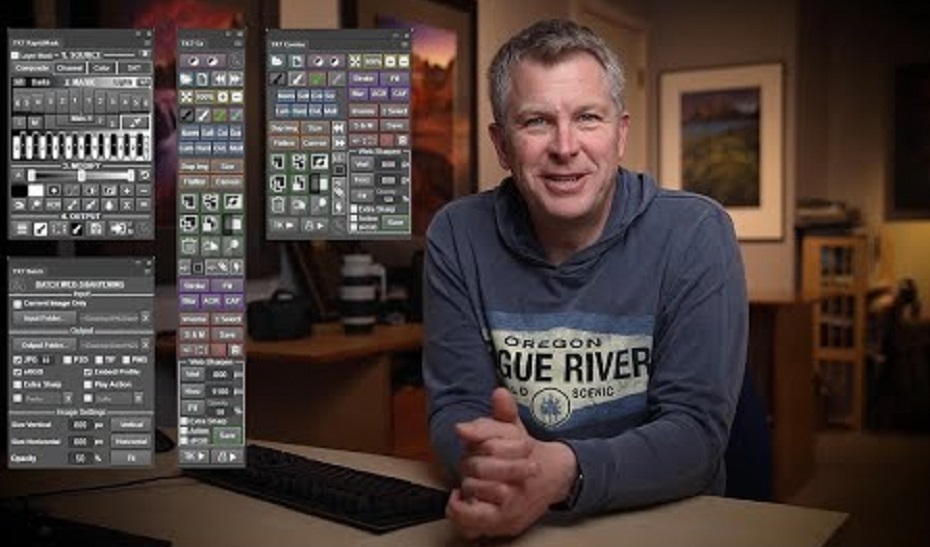
The TK7 panel is the newest release of the comprehensive panel for making luminosity masks and running Photoshop. It includes all the features of the previous V6 panel plus many new ones. Like its predecessor, the TK7 panel is modular, so users can configure it in whatever manner works best in their workspace. The Combo module even has two different arrangements to allow a new compact layout if that’s desired. (Sean Bagshaw has a video at the bottom of this page that shows how to do this.) TK panels are used worldwide and come pre-programmed with six common languages: English, Spanish, German, French, Italian, and Chinese. Users can choose the language they prefer.
RapidMask
-
- Multiple masks/multiple sources−The TK7 panel is much more than just a luminosity mask panel. Channel, color, saturation, and vibrance masks are created just as easily as luminosity masks, and entire spectrums of these pixel-based, self-feathering masks can be generated. The SOURCE menus makes it easy to choose different pixel data as the starting point for making masks
-
- Organized workflow−Four distinct sections−SOURCE, MASK, MODIFY, and OUTPUT−that guide users through the mask-making process.
-
- New masks−TK7 now has Color Zone masks and CMYK masks.
-
- Add and subtract masks with ease−The mask calculator provides an easy way to add, subtract, or intersect any mask created by the panel.
-
- More MODIFY options-New modify functions allow precision masks through painting, burning, dodging, and even Photoshop’s Camera Raw filter.
-
- Numerous output options−Easily create adjustment layers and pixel layers with the current Rapid Mask as a layer mask.
-
- Layer Mask mode−Provides an image-based approach to quickly choose or create the best mask by having the mask applied directly as a layer mask on the active layer.
-
- Accent color interface−Only one accent color for the entire module that users can change to whatever they prefer.
-
- Click-tracking−Buttons retain an accent-colored shadow after clicking so users can track which mask they last chose.
Combo/Cx
-
- Compact design−Combines Photoshop control, web-sharpening, and creative actions into one module.
-
- Run Photoshop from the module−Many common Photoshop functions, keyboard shortcuts, and menu items can be run with a single button click from the module.
-
- Muted color interface−Separates buttons into logical groups in order to quickly find the correct Photoshop function.
-
- Multi-function buttons−Several buttons have dual functions that are graphically displayed on the button itself or can be activated with the CTRL/command key.
-
- Use the “TK ▶” button to access the creative Photoshop actions menu−Includes new actions Freehand Vignette, Spotlight, Dehaze and Add Color.
-
- Exposure blending actions−Stack, Align, and Focus Blend are part of the “TK ▶” button.
-
- Integrated web-sharpening−TK7 now provides multi-dimension support. Sharpen images for the web to any dimension, convert to sRGB, and run post-sharpening actions.
-
- Expanded user actions−Ten programmable actions, accessed via the “User ▶” button, allow users to run their own actions directly from the panel.
Batch
-
- Multi-image sharpening−Resize and sharpen entire folders of images for the web with one button click.
-
- Multi-dimension sharpening−TK7 now allows different vertical and horizontal dimensions that can be combined for folders containing both vertical and horizontal images that need to be resized differently.
All Modules
-
- Active selection indicator−Shows when there is an active selection even if there are no marching ants visible.
- Rollover help−Holding down the ALT/option key and rolling over a button displays a help message at either the top or the bottom of the module.
TKActions v7.1 Panels for Adobe Photoshop: 1.7 MB