



• Home
  • DMCA
  • Contact Us
  • Advertise
Subscribe On Telegram
Chat With Us
Request Anything
Monday, April 27, 2026
VFXDownload.Net
  • After Effects
    • After Effects Project
    • Audio Spectrum
    • Title
    • Elements
    • Openers
    • Promo
    • Video Displays
    • Music Visualizer
    • Logo Opener/String/Intro
  • Premiere Pro
    • Premiere Pro Logo
    • MOGRT
    • Premiere Pro Project
    • Title
  • Graphics & Arts
  • Sounds
  • Courses
  • Plugins & Scripts
No Result
View All Result
VFXDownload.Net
  • After Effects
    • After Effects Project
    • Audio Spectrum
    • Title
    • Elements
    • Openers
    • Promo
    • Video Displays
    • Music Visualizer
    • Logo Opener/String/Intro
  • Premiere Pro
    • Premiere Pro Logo
    • MOGRT
    • Premiere Pro Project
    • Title
  • Graphics & Arts
  • Sounds
  • Courses
  • Plugins & Scripts
No Result
View All Result
VFXDownload.Net
No Result
View All Result
Home Free Course

How to Create a Product Box in After Effects and Element 3D using Cinema 4D and Photoshop

May 26, 2020
in Free Course
0
How to Create a Product Box in After Effects and Element 3D using Cinema 4D and Photoshop

RelatedPosts

Startup Business Plan Course | A Bootcamp with Workbook By Hussein-Elhakim Al Issa

Startup Business Plan Course | A Bootcamp with Workbook By Hussein-Elhakim Al Issa

December 26, 2025
Lunacy the complete guide UI and UX designs for applications By Nicolas Forgue

Lunacy the complete guide UI and UX designs for applications By Nicolas Forgue

December 26, 2025

Download FREE How to Create a Product Box in After Effects and Element 3D using Cinema 4D and Photoshop – Skillshare – Free Tutorial Download

How to Create a Product Box in After Effects and Element 3D using Cinema 4D and Photoshop Free Download – Tutorial Download

English | 46m | Video: 720p | 313 Mb

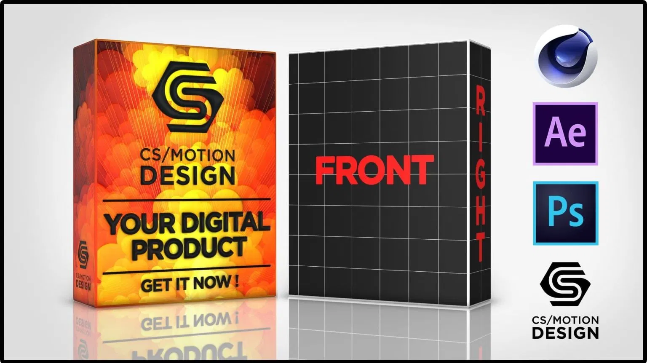
In this tutorial, i will show you the workflow between cinema 4d and the plugin element 3D for after effects to create a product box.

First, what do you need?
you need Cinema 4D, Photoshop, After effects and the plugin element 3D.
You should bring some basic knowledge with you. But most of the stuff I will explain in detail.

We will start with modeling the box in Cinema 4D.
Then we take care of the uv map in Cinema 4d to use it in photoshop and after effects.

Then we continue by importing our model into After effects and Element 3D.
here we take care of the compositing and the animation of the product box.

I will also briefly explain the free program Materialize with which we will create a normal map.

We will use this normal map to add more details to our artwork.

After finishing this tutorial series you will have a product box template available with which you can quickly and smartly customize or exchange your artwork.

Beside the better understanding for the options in Element 3D,
you will also have a better understanding of the workflow for preparing 3d models from cinema 4d for element 3d.

☗ Download more for free ☗

  • â–¶ Premiere Pro Templates Free
  • â–¶ After Effects project Free
  • â–¶ Free Softwares
  • â–¶ Free Course
  • â–¶ Free Graphics & Vector Art


How to Create a Product Box in After Effects and Element 3D using Cinema 4D and Photoshop Free Download


JOIN OUR TELEGRAM SUPPORT GROUP

HOW TO DOWNLOAD

 View Demo & Info Page

How to Create a Product Box in After Effects and Element 3D using Cinema 4D and Photoshop

File-up – 1.8 GB thanks gif

Join @vfxdownloadnet on Telegram
Tags: Create a Product BoxCreate a Product Box in After EffectsHow to Create a Product BoxHow to Create a Product Box in After Effects and Element 3DHow to Create a Product Box in After Effects and Element 3D using Cinema 4D and Photoshop

Related Posts

Startup Business Plan Course | A Bootcamp with Workbook By Hussein-Elhakim Al Issa
Free Course

Startup Business Plan Course | A Bootcamp with Workbook By Hussein-Elhakim Al Issa

December 26, 2025
Lunacy the complete guide UI and UX designs for applications By Nicolas Forgue
Free Course

Lunacy the complete guide UI and UX designs for applications By Nicolas Forgue

December 26, 2025
Learn Automatic Proximity Reactions in After Effects (2D+3D) By Vlad Sateev
Free Course

Learn Automatic Proximity Reactions in After Effects (2D+3D) By Vlad Sateev

December 26, 2025
Fotor Masterclass 2026 — From Beginner to Pro By The Takeoff College
Free Course

Fotor Masterclass 2026 — From Beginner to Pro By The Takeoff College

December 26, 2025
Create Ultra-Realistic AI Influencers with 100% Free Tools By Alvi Kaston
Free Course

Create Ultra-Realistic AI Influencers with 100% Free Tools By Alvi Kaston

December 26, 2025
Complete Python Course for IT Administrators By Neamatullah Ekhteyari
Free Course

Complete Python Course for IT Administrators By Neamatullah Ekhteyari

December 26, 2025
0 0 votes
Article Rating
Subscribe
Notify of

This site uses Akismet to reduce spam. Learn how your comment data is processed.

0 Comments
Oldest
Newest Most Voted
Inline Feedbacks
View all comments

Categories

Subscribe VFX

Join Chat Group

VFX Request Bots

Most Popular Packs!!!

How To Download Files

Free Download!!!!!!


Facebook Telegram

Pages

  • Advertise
  • Contact Us
  • DMCA
  • How To Download
  • Privacy Policy
  • Search
  • VFXDownload.Net

Top Categories

  • After Effects
  • Adobe Premiere Pro
  • Free Course
  • Motion Graphics
  • Exclusive
  • Google Drive Courses/Packs
  • Plugin & Script

Copyright © 2020-2025 VFXDownload.Net

No Result
View All Result
  • After Effects
    • After Effects Project
    • Audio Spectrum
    • Title
    • Elements
    • Openers
    • Promo
    • Video Displays
    • Music Visualizer
    • Logo Opener/String/Intro
  • Premiere Pro
    • Premiere Pro Logo
    • MOGRT
    • Premiere Pro Project
    • Title
  • Graphics & Arts
  • Sounds
  • Courses
  • Plugins & Scripts

Copyright © 2020-2025 VFXDownload.Net

wpDiscuz
0
0
Would love your thoughts, please comment.x
()
x
| Reply


















