


Download TKactions v7.2 Tutorials – Goodlight – Free Course Download
Goodlight TK actions v7.2 updated + tutorialsFree Download – Tutorials Collections
TKactions v7.2 + Tutorials details can be found below by pressing Buy Here or View Demo Button. VFXDownload.Net Is a free Graphics or VFX Content Provider Website Which Helps Beginner Graphics Designers like Free-Lancers who need some stuff like Major Categories Motion Graphics Elements, Transitions, Photoshop Plugins, Illustrator Plugins, Graphics & Vector, Creative market, videohive, Graphicriver, Stock Footages, After Effects Template, After Effects – Premiere Pro Plugin & Scripts, Premiere Pro Template, Sounds Effects, Free Luts, Free Courses, free softwares, etc in vfxdownload.net.
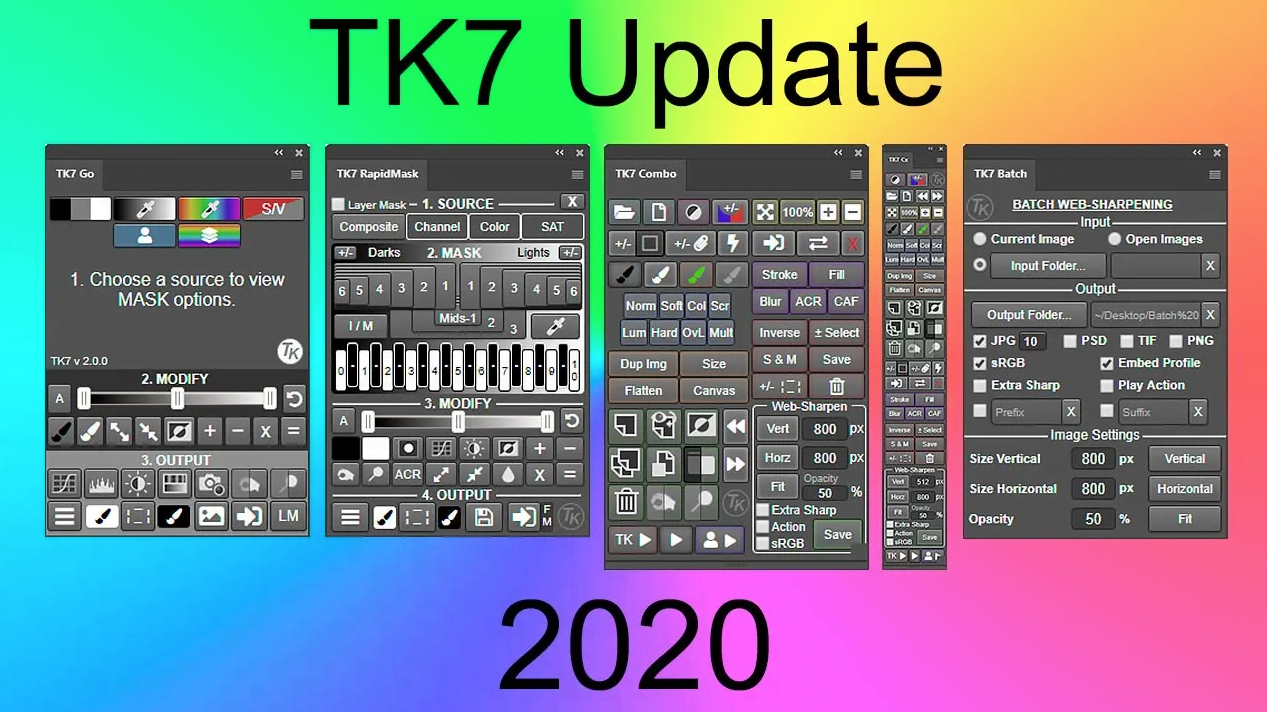
- New for 2020−The newly designed Go module makes masks by a new process. They’re still fast and they’re still 16-bit.
- Three-step process for making masks−MASK, MODIFY, and OUTPUT. Just work top to bottom to create and deploy an infinite number of pixel-based masks.
- Updated masks−New Zone masks are more linear with respect to the tonal spectrum and Infinity Color masks now have color presets and enhanced brightness control.
- Add and subtract masks with ease−The mask calculator provides an easy way to add, subtract, or intersect any mask created by the panel.
- Easy access output options−The most common output options are right on the main interface.
- Accent color interface−Only one accent color for the entire module that users can change to whatever they prefer.
- Click-tracking−Buttons retain an accent-colored shadow after clicking so users can track which mask they last chose.
- Right-click color tagging.−Give your favorite menu items their own highlight color in order to find them easily.
RapidMask
- Multiple masks/multiple sources−The TK7 panel is much more than just a luminosity mask panel. Channel, color, saturation, and vibrance masks are created just as easily as luminosity masks, and entire spectrums of these pixel-based, self-feathering masks can be generated. The SOURCE menus makes it easy to choose different pixel data as the starting point for making masks
- Organized workflow−Four distinct sections−SOURCE, MASK, MODIFY, and OUTPUT−that guide users through the mask-making process.
- New masks−TK7 now has infinity color masks for creating masks based on hue and saturation.
- Add and subtract masks with ease with the built-in mask calculator.
- More MODIFY options-New modify functions allow precision masks through painting, burning, dodging, and even Photoshop’s Camera Raw filter.
- Numerous output options−Easily create adjustment layers and pixel layers with the current Rapid Mask as a layer mask.
- Layer Mask mode−Provides an image-based approach to quickly choose or create the best mask by having the mask applied directly as a layer mask on the active layer.
- Accent color interface
- Right-click color-tagging in the OUTPUT menu.
Combo/Cx
- Compact design−Combines Photoshop control, web-sharpening, and creative actions into one module.
- Run Photoshop from the module−Many common Photoshop functions, keyboard shortcuts, and menu items can be run with a single button click from the module.
- Muted color interface−Separates buttons into logical groups in order to quickly find the correct Photoshop function.
- Multi-function buttons−Several buttons have dual functions that are graphically displayed on the button itself or can be activated with the CTRL/command key.
- Use the “TK ▶” button to access the creative Photoshop actions menu−Includes new actions Freehand Vignette, Spotlight, Dehaze and Add Color, and, new to in June 2020, Soft Pop and Paint Contrast.
- Exposure blending actions−Stack, Align, and Focus Blend are part of the “TK ▶” button.
- Integrated web-sharpening−TK7 now provides multi-dimension support. Sharpen images for the web to any dimension, convert to sRGB, and run post-sharpening actions.
- Expanded user actions−Fifteen user actions, accessed via the “User ▶” button, allow users to run their own actions directly from the panel.
- Progammable buttons−These modules now have 23 buttons that can be reprogrammed with user’s favorite action. See video above for a demonstartion.
- Right-click color-tagging−Buttons and menu items can be given enhanced colors for faster reference.
Batch
- Multi-image sharpening−Resize and sharpen entire folders of images for the web with one button click.
- Multi-dimension sharpening−TK7 now allows different vertical and horizontal dimensions that can be combined for folders containing both vertical and horizontal images that need to be resized differently.
All Modules
- Active selection indicator−Shows when there is an active selection even if there are no marching ants visible.
- Rollover help−Holding down the ALT/option key and rolling over a button displays a help message at either the top or the bottom of the module.
Goodlight TKactions v7.2 Tutorials Free Download (2.6 GB)