• Home
  • DMCA
  • Contact Us
  • Advertise
Subscribe On Telegram
Chat With Us
Request Anything
Saturday, November 28, 2026
VFXDownload.Net
  • After Effects
    • After Effects Project
    • Audio Spectrum
    • Title
    • Elements
    • Openers
    • Promo
    • Video Displays
    • Music Visualizer
    • Logo Opener/String/Intro
  • Premiere Pro
    • Premiere Pro Logo
    • MOGRT
    • Premiere Pro Project
    • Title
  • Graphics & Arts
  • Sounds
  • Courses
  • Plugins & Scripts
No Result
View All Result
VFXDownload.Net
No Result
View All Result
Home After Effects

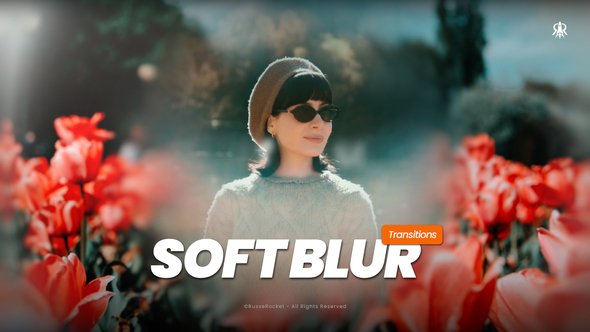
VideoHive Soft Blur Transitions 61544842

November 28, 2026
in After Effects, Elements
0
VideoHive Soft Blur Transitions 61544842
Soft Blur Transitions is an Adobe After Effects template with customizable blur transitions, modular scenes, and no plugins required. Adjust text, colors, images, and timing for Full HD videos.

Free Download Soft Blur Transitions. These After Effects transitions give editors a quick way to move between scenes with a soft blur effect. The template suits creators at any level, from marketers to filmmakers, because text, colors, images, and timing stay 100% customizable without advanced skills.
The modular structure lets you rearrange or trim segments, and no plugins are required. RusseRocket includes Full HD output, adjustable duration, organized project files, and a step-by-step tutorial.

Overview of Soft Blur Transitions

Soft Blur Transitions is an Adobe After Effects template from RusseRocket for creators who want smooth blur transitions without a long setup. Content creators, filmmakers, marketers, and designers can change text, colors, images, and timing with no advanced skills. The modular structure lets you rearrange scenes or add and remove segments to match your story. No plugins are required, so you can import assets and start editing. It outputs in Full HD 1920×1080, and the project length is adjustable. Organized project files keep the workflow clear, and a step-by-step video tutorial helps you get started quickly. It suits short social videos, client work, and other projects that need flexible transitions and a clean editing process.

Features of Soft Blur Transitions

  • Built for Adobe After Effects, so you edit inside the timeline and workspace you already use.
  • Customizable text, colors, images, and timing. No advanced skills needed.
  • Modular structure lets you rearrange scenes or add and remove segments to fit your story.
  • No plugins required. Import your assets and start editing in After Effects.
  • Full HD 1920×1080 output for clear video.
  • Adjustable project length to match your content.
  • Organized project files keep the workflow clear and easy to follow.
  • Includes a step-by-step video tutorial to help you get started quickly.
  • RusseRocket designed the template with a modern aesthetic and flexible editing in mind.

How to use Soft Blur Transitions

  • Download the Soft Blur Transitions template from vfxdownload.net. Keep the downloaded files in one folder so they are easy to find.
  • Open After Effects, then open the template project file from that folder.
  • Check the Project panel and locate the transition composition you want to use.
  • Add your footage to the composition. Place the clips so the blur transition sits between the two shots you want to connect.
  • Preview the composition in the Composition panel. Watch it at normal speed and confirm the timing works for your edit. This gives you a clear view of the blur before you commit to the final render.
  • Adjust placement or timing inside After Effects if needed. Render the finished composition once the transition looks right.

Download More For Free :

  • Premiere Pro Templates
  • After Effects project
  • Apple Motion Templates
  • Graphics & Vector Art
  • Free Sound Effects
  • Plugin & Script

Soft Blur Transitions Demo and Download

To get Soft Blur Transitions, open the vfxdownload.net page for this After Effects template. Scroll to the download section. Click the download button to start the download. The template is 100% customizable, so you can adjust text, colors, images, and timing. It is designed for Adobe After Effects and suits creators at different skill levels. Keep the page open until your download begins.

https://s3.envato.com/h264-video-previews/0d991ae4-fc78-46b2-beec-02b20dd3c038/61544842.mp4

VideoHive – Soft Blur Transitions | Size: 46.58 MB

HOW TO DOWNLOAD INFORMATION

Premium Fast-Speed Links

Fast Prefiles  NitroFlare  Turbobit  RapidGator

Free Slow-Speed Links

File-Up  Usersdrive

Disclaimer

Soft Blur Transitions is an After Effects template by VideoHive. The demo content on this page is for educational use only. It does not grant commercial rights. Commercial use requires a purchase from vfxdownload.net. Use the demo to evaluate the template before buying. All rights remain with their respective owners.


Join @vfxdownloadnet on Telegram
Tags: 4kAfter EffectsbackgroundblurchangeCinematicclipCreativecustomizabledesigndragdramaticdropDynamiceasyeditingeffectsElegantengagingfootagefullhdimpactfulModernMotion GraphicsoverlayPluginsproductionprofessionalqualityresolutionsceneseamlessSmoothsoftSoft Blur TransitionsSoft Blur Transitions 61544842Soft Blur Transitions downloadSoft Blur Transitions for After EffectssophisticatedStylishtransitionstransitions17trendyversatileVideohive Soft Blur TransitionsVideohive Soft Blur Transitions 61544842Videohive Soft Blur Transitions 61544842 Free DownloadVideohive Soft Blur Transitions Free DownloadVisualwendigo

Related Posts

VideoHive Wedding Photo Slideshow 61539536
After Effects

VideoHive Wedding Photo Slideshow 61539536

November 28, 2026
VideoHive Movies Opener 61588336
After Effects

VideoHive Movies Opener 61588336

November 28, 2026
VideoHive Insurance Presentation // Insurance Company Promo 15640831
After Effects

VideoHive Insurance Presentation // Insurance Company Promo 15640831

November 28, 2026
VideoHive Gradient Background Master Pack for After Effects – 100 Animated Backgrounds 61426871
After Effects

VideoHive Gradient Background Master Pack for After Effects – 100 Animated Backgrounds 61426871

November 27, 2026
VideoHive Glitch Logo 61527902
After Effects

VideoHive Glitch Logo 61527902

November 27, 2026
VideoHive Fashion Promo 61518154
After Effects

VideoHive Fashion Promo 61518154

November 27, 2026
0 0 votes
Article Rating
Subscribe
Notify of

This site uses Akismet to reduce spam. Learn how your comment data is processed.

0 Comments
Oldest
Newest Most Voted

Categories

Subscribe VFX

Join Chat Group

VFX Request Bots

Most Popular Packs!!!

How To Download Files

Free Download!!!!!!


Facebook Telegram

Pages

  • Advertise
  • Contact Us
  • DMCA
  • How To Download
  • Privacy Policy
  • Search
  • VFXDownload.Net

Top Categories

  • After Effects
  • Adobe Premiere Pro
  • Free Course
  • Motion Graphics
  • Exclusive
  • Google Drive Courses/Packs
  • Plugin & Script

Copyright © 2020-2025 VFXDownload.Net

No Result
View All Result
  • After Effects
    • After Effects Project
    • Audio Spectrum
    • Title
    • Elements
    • Openers
    • Promo
    • Video Displays
    • Music Visualizer
    • Logo Opener/String/Intro
  • Premiere Pro
    • Premiere Pro Logo
    • MOGRT
    • Premiere Pro Project
    • Title
  • Graphics & Arts
  • Sounds
  • Courses
  • Plugins & Scripts

Copyright © 2020-2025 VFXDownload.Net

wpDiscuz
0
0
Would love your thoughts, please comment.x
()
x
| Reply