• Home
  • DMCA
  • Contact Us
  • Advertise
Subscribe On Telegram
Chat With Us
Request Anything
Tuesday, November 24, 2026
VFXDownload.Net
  • After Effects
    • After Effects Project
    • Audio Spectrum
    • Title
    • Elements
    • Openers
    • Promo
    • Video Displays
    • Music Visualizer
    • Logo Opener/String/Intro
  • Premiere Pro
    • Premiere Pro Logo
    • MOGRT
    • Premiere Pro Project
    • Title
  • Graphics & Arts
  • Sounds
  • Courses
  • Plugins & Scripts
No Result
View All Result
VFXDownload.Net
No Result
View All Result
Home Adobe Premiere Pro

VideoHive Multi Screen Transitions 62318592

November 24, 2026
in Adobe Premiere Pro
0
VideoHive Multi Screen Transitions 62318592
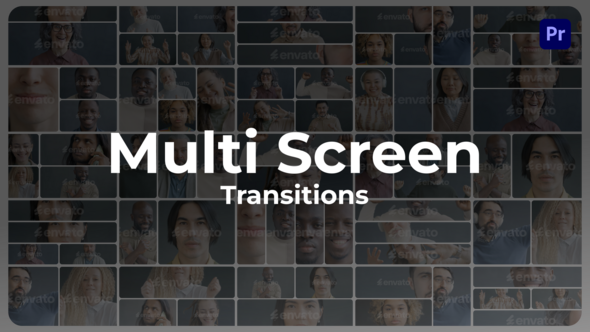
Multi Screen Transitions is a modular Premiere Pro template with MOGRT files, Full HD color control, and video or photo holders. It is easy to customize.

Free Download Multi Screen Transitions. RojinDesign’s multi-screen transition pack gives Adobe Premiere Pro editors a modular way to move between clips and stills.
It works in Premiere Pro 2021 and above, supports Full HD 1920×1080, and includes MOGRT files with color control and video or photo holders.
The organized layout is easy to customize, and a detailed help file is included.

Overview of Multi Screen Transitions

Multi Screen Transitions from RojinDesign gives editors a practical way to build multi screen layouts in Premiere Pro 2021 and above. The template works at Full HD 1920×1080 and uses a modular structure with MOGRT files, so you can adjust sections without rebuilding the whole sequence.
Color control and an organized layout make customization straightforward. Drop footage into the video or photo holders, then refine the look to suit your project. A detailed help file is included, and RojinDesign invites questions through the profile page.
This set suits editors who need flexible multi screen transitions for Premiere Pro projects. It keeps the setup clear and the editing process direct.

Features of Multi Screen Transitions

  • Built for Adobe Premiere Pro 2021 and above, so the transitions fit directly into a familiar editing timeline.
  • Ships as MOGRT files for use in Premiere Pro.
  • Full HD 1920×1080 output for projects that need clean standard-resolution delivery.
  • Modular structure lets you place and rearrange multi screen sections without rebuilding the whole sequence.
  • Color Control gives you a direct way to adjust the look inside the template.
  • Video or Photo Holders support both clip types in the same edit.
  • Well organized template and a detailed help file make setup easier to follow.
  • Contact the creator through the profile page if questions come up.

How to use Multi Screen Transitions

  1. Open Adobe Premiere Pro and create a new project or open an existing one.
  2. Import your footage and add the clips you want to connect to the timeline.
  3. Locate the Multi Screen Transitions template files and import them into your project panel.
  4. Drag the transition you want onto the timeline, placing it between two clips.
  5. Adjust the duration by dragging the edges of the transition to match your edit.
  6. Double-click the transition to open its controls and tweak settings such as screen layout and timing.
  7. Preview the result in the program monitor and render if needed.

Keep your sequence settings consistent with your footage so the transition displays correctly.

Download More For Free :

  • Premiere Pro Templates
  • After Effects project
  • Apple Motion Templates
  • Graphics & Vector Art
  • Free Sound Effects
  • Plugin & Script

Multi Screen Transitions Demo and Download

Scroll to the download section on vfxdownload.net and click the download button to get the Multi Screen Transitions template. It works in Premiere Pro 2021 and above and supports Full HD 1920×1080. The package uses a modular structure with MOGRT files, color control, video or photo holders, and a detailed help file. The template is well organized and easy to customize. Use the download button to start.

https://s3.envato.com/h264-video-previews/07a9a3e6-a6b9-406e-b8bd-cf63b84c4a0b/62318592.mp4

VideoHive – Multi Screen Transitions | Size: 2.66 MB

HOW TO DOWNLOAD INFORMATION

Premium Fast-Speed Links

Fast Prefiles  NitroFlare  Turbobit  RapidGator

Free Slow-Speed Links

File-Up  Usersdrive

Disclaimer

This disclaimer applies to the Multi Screen Transitions template by VideoHive. The demo content is provided for educational use only. It does not grant commercial rights. To use this template for commercial projects, you must purchase it from vfxdownload.net. All product details, licensing terms, and compatibility should be verified on the official source before use.


Join @vfxdownloadnet on Telegram
Tags: broadcastCinematiccleancollageconstructorCorporatedrag and dropeditingEventFashionFilmfilmmakergridhandyimageIntrominimalModernmontagemosaicmulti displaymulti photomulti screenMulti Screen Transitions 62318592Multi Screen Transitions for Adobe Premiere ProMulti VideoMulti-Screen TransitionsMulti-Screen Transitions downloadmultiframemultiscreenoverlayPhotoPresentationPromoscreenseamlessSeamless TransitionsSlideshowslideshow makerslideshow toolkitSocial MediasplitSplit ScreenSportstransition toolkittransitionsTransitions PackTravelvideovideo editingVideohive Multi Screen Transitions 62318592Videohive Multi Screen Transitions 62318592 Free DownloadVideohive Multi-Screen TransitionsVideohive Multi-Screen Transitions Free Downloadvideomakervlog

Related Posts

VideoHive Mystery Smoke Wind Blow Elegant Opener MOGRT 62324567
Adobe Premiere Pro

VideoHive Mystery Smoke Wind Blow Elegant Opener MOGRT 62324567

November 24, 2026
VideoHive Minimal Smooth Opener | Premiere Pro MOGRT 62295654
Adobe Premiere Pro

VideoHive Minimal Smooth Opener | Premiere Pro MOGRT 62295654

November 24, 2026
VideoHive Logo Reveal | MOGRT 62324053
Adobe Premiere Pro

VideoHive Logo Reveal | MOGRT 62324053

November 24, 2026
VideoHive Intro Podcast Fashion / MOGRT 62255105
Adobe Premiere Pro

VideoHive Intro Podcast Fashion / MOGRT 62255105

November 24, 2026
VideoHive Trendy Logo | MOGRT 62324070
Adobe Premiere Pro

VideoHive Trendy Logo | MOGRT 62324070

November 23, 2026
VideoHive Text Animations 62346667
Adobe Premiere Pro

VideoHive Text Animations 62346667

November 23, 2026
0 0 votes
Article Rating
Subscribe
Notify of

This site uses Akismet to reduce spam. Learn how your comment data is processed.

0 Comments
Oldest
Newest Most Voted

Categories

Subscribe VFX

Join Chat Group

VFX Request Bots

Most Popular Packs!!!

How To Download Files

Free Download!!!!!!


Facebook Telegram

Pages

  • Advertise
  • Contact Us
  • DMCA
  • How To Download
  • Privacy Policy
  • Search
  • VFXDownload.Net

Top Categories

  • After Effects
  • Adobe Premiere Pro
  • Free Course
  • Motion Graphics
  • Exclusive
  • Google Drive Courses/Packs
  • Plugin & Script

Copyright © 2020-2025 VFXDownload.Net

No Result
View All Result
  • After Effects
    • After Effects Project
    • Audio Spectrum
    • Title
    • Elements
    • Openers
    • Promo
    • Video Displays
    • Music Visualizer
    • Logo Opener/String/Intro
  • Premiere Pro
    • Premiere Pro Logo
    • MOGRT
    • Premiere Pro Project
    • Title
  • Graphics & Arts
  • Sounds
  • Courses
  • Plugins & Scripts

Copyright © 2020-2025 VFXDownload.Net

wpDiscuz
0
0
Would love your thoughts, please comment.x
()
x
| Reply