• Home
  • DMCA
  • Contact Us
  • Advertise
Subscribe On Telegram
Chat With Us
Request Anything
Wednesday, November 25, 2026
VFXDownload.Net
  • After Effects
    • After Effects Project
    • Audio Spectrum
    • Title
    • Elements
    • Openers
    • Promo
    • Video Displays
    • Music Visualizer
    • Logo Opener/String/Intro
  • Premiere Pro
    • Premiere Pro Logo
    • MOGRT
    • Premiere Pro Project
    • Title
  • Graphics & Arts
  • Sounds
  • Courses
  • Plugins & Scripts
No Result
View All Result
VFXDownload.Net
No Result
View All Result
Home Adobe Premiere Pro

VideoHive Paper Surface Dust & Scratches FX Overlays Pack MOGRT 61086636

December 30, 2025
in Adobe Premiere Pro
0
VideoHive Paper Surface Dust & Scratches FX Overlays Pack MOGRT 61086636
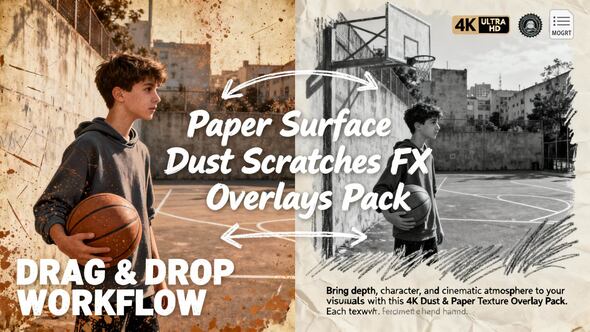
Add authentic analog textures with the Paper Surface Dust & Scratches FX Overlays Pack. Perfect for vintage video effects, this pack supports major editing software with easy drag-and-drop use.

Free Download Paper Surface Dust & Scratches FX Overlays Pack MOGRT. Add a vintage and cinematic touch to your projects with the Paper Surface Dust & Scratches FX Overlays Pack. This collection of 11 overlays offers real paper surface details, including natural dust and soft grain. Ideal for Adobe Premiere Pro users, these overlays are easy to use—simply drag and drop onto your media and select a blending mode like Screen or Overlay. Perfect for intros, social media videos, and more.

Overview of Paper Surface Dust & Scratches FX Overlays Pack MOGRT

The Paper Surface Dust & Scratches FX Overlays Pack offers a collection of 11 high-quality overlays designed to give your projects a vintage, cinematic look. These overlays feature real paper surface details, such as natural dust, micro scratches, and soft grain, which instantly add depth and atmosphere to your videos. They’re user-friendly—just drag and drop on your media and select a blending mode like Screen or Overlay. Compatible with major software like Adobe Premiere Pro and After Effects, this pack requires no plugins and supports 4K format for stunning visuals. Perfect for intros, social media videos, and film-style compositions.

Features of Paper Surface Dust & Scratches FX Overlays Pack MOGRT

  • 11 High-Quality Overlays: Perfect for adding a vintage, cinematic look to your projects.
  • Real Paper Surface Details: Features natural dust, micro scratches, and soft grain.
  • Easy Integration with Adobe Premiere Pro: Simply drag and drop onto your media.
  • Compatibility: Works seamlessly with Adobe After Effects, MOGRT templates, DaVinci Resolve, Final Cut Pro, and more.
  • No Plugins Required: Set up quickly without additional software.
  • Supports All Blending Modes: Use Screen, Add, Lighten, or Overlay to achieve different effects.
  • 4K Format: Delivers stunning, high-resolution textures.
  • Versatile Usage: Ideal for intros, social media videos, retro aesthetics, and more.

How to use Paper Surface Dust & Scratches FX Overlays Pack MOGRT

1. Open Adobe Premiere Pro and import your video footage.

2. Drag your video to the timeline to start editing.

3. Import the Paper Surface Dust & Scratches FX Overlays Pack into the project by clicking on File > Import.

4. Select the overlay you want and drag it above your video layer in the timeline.

5. Highlight the overlay clip on the timeline.

6. Go to the Effect Controls panel.

7. Under Opacity, change the blending mode to Screen, Add, Lighten, or Overlay to achieve the desired effect.

8. Adjust the overlay’s position and duration as needed to match your video.

9. Preview your video to ensure the effect looks as expected.

10. Export your final video by clicking on File > Export > Media and select your preferred settings.

Download More For Free :

  • Premiere Pro Templates
  • After Effects project
  • Apple Motion Templates
  • Graphics & Vector Art
  • Free Sound Effects
  • Plugin & Script

Paper Surface Dust & Scratches FX Overlays Pack MOGRT Demo and Download

To download the Paper Surface Dust & Scratches FX Overlays Pack from VFXDownload.net, scroll to the download section. Click the download button. Follow any on-screen instructions to complete your download. Make sure your internet connection is stable for a smooth process.

https://s3.envato.com/h264-video-previews/55ff1db0-09e0-481c-ad92-b8a5c71495f5/61086636.mp4

VideoHive – Paper Surface Dust & Scratches FX Overlays Pack MOGRT | Size: 444.7 MB

HOW TO DOWNLOAD INFORMATION

Premium Fast-Speed Links

Fast Prefiles  NitroFlare  Turbobit  RapidGator

Free Slow-Speed Links

File-Up  Usersdrive

Disclaimer

The Paper Surface Dust & Scratches FX Overlays Pack available on VFXDownload.net is intended for educational use only. For any commercial applications, you must purchase the pack directly from VideoHive. Ensure compliance with all licensing terms for proper usage.


Join @vfxdownloadnet on Telegram
Tags: 4kanalogcelluloseCinematicdamagedirtdistresseddustfibersFilmgraingrungeimperfectmattenoiseold filmorganicoverlayoverlay fxpaperPaper Surface Dust & Scratches FX Overlays Pack MOGRTPaper Surface Dust & Scratches FX Overlays Pack MOGRT 61086636Paper Surface Dust & Scratches FX Overlays Pack MOGRT downloadPaper Surface Dust & Scratches FX Overlays Pack MOGRT for Adobe Premiere ProparticlesrealismresidueRetroscratchscratchessurfacetactiletextureVideohive Paper Surface Dust & Scratches FX Overlays Pack MOGRTVideohive Paper Surface Dust & Scratches FX Overlays Pack MOGRT 61086636Videohive Paper Surface Dust & Scratches FX Overlays Pack MOGRT 61086636 Free DownloadVideohive Paper Surface Dust & Scratches FX Overlays Pack MOGRT Free DownloadVintage

Related Posts

VideoHive Holo Lines Technology Logo Reveal 61810702
Adobe Premiere Pro

VideoHive Holo Lines Technology Logo Reveal 61810702

November 25, 2026
VideoHive Fast Intro | Premiere Pro MOGRT 61872746
Adobe Premiere Pro

VideoHive Fast Intro | Premiere Pro MOGRT 61872746

November 25, 2026
VideoHive Elegant Opener | Premiere Pro MOGRT 61855820
Adobe Premiere Pro

VideoHive Elegant Opener | Premiere Pro MOGRT 61855820

November 25, 2026
VideoHive Mystery Smoke Wind Blow Elegant Opener MOGRT 62324567
Adobe Premiere Pro

VideoHive Mystery Smoke Wind Blow Elegant Opener MOGRT 62324567

November 24, 2026
VideoHive Multi Screen Transitions 62318592
Adobe Premiere Pro

VideoHive Multi Screen Transitions 62318592

November 24, 2026
VideoHive Minimal Smooth Opener | Premiere Pro MOGRT 62295654
Adobe Premiere Pro

VideoHive Minimal Smooth Opener | Premiere Pro MOGRT 62295654

November 24, 2026
0 0 votes
Article Rating
Subscribe
Notify of

This site uses Akismet to reduce spam. Learn how your comment data is processed.

0 Comments
Oldest
Newest Most Voted

Categories

Subscribe VFX

Join Chat Group

VFX Request Bots

Most Popular Packs!!!

How To Download Files

Free Download!!!!!!


Facebook Telegram

Pages

  • Advertise
  • Contact Us
  • DMCA
  • How To Download
  • Privacy Policy
  • Search
  • VFXDownload.Net

Top Categories

  • After Effects
  • Adobe Premiere Pro
  • Free Course
  • Motion Graphics
  • Exclusive
  • Google Drive Courses/Packs
  • Plugin & Script

Copyright © 2020-2025 VFXDownload.Net

No Result
View All Result
  • After Effects
    • After Effects Project
    • Audio Spectrum
    • Title
    • Elements
    • Openers
    • Promo
    • Video Displays
    • Music Visualizer
    • Logo Opener/String/Intro
  • Premiere Pro
    • Premiere Pro Logo
    • MOGRT
    • Premiere Pro Project
    • Title
  • Graphics & Arts
  • Sounds
  • Courses
  • Plugins & Scripts

Copyright © 2020-2025 VFXDownload.Net

wpDiscuz
0
0
Would love your thoughts, please comment.x
()
x
| Reply