• Home
  • DMCA
  • Contact Us
  • Advertise
Subscribe On Telegram
Chat With Us
Request Anything
Monday, December 22, 2025
VFXDownload.Net
  • After Effects
    • After Effects Project
    • Audio Spectrum
    • Title
    • Elements
    • Openers
    • Promo
    • Video Displays
    • Music Visualizer
    • Logo Opener/String/Intro
  • Premiere Pro
    • Premiere Pro Logo
    • MOGRT
    • Premiere Pro Project
    • Title
  • Graphics & Arts
  • Sounds
  • Courses
  • Plugins & Scripts
No Result
View All Result
VFXDownload.Net
  • After Effects
    • After Effects Project
    • Audio Spectrum
    • Title
    • Elements
    • Openers
    • Promo
    • Video Displays
    • Music Visualizer
    • Logo Opener/String/Intro
  • Premiere Pro
    • Premiere Pro Logo
    • MOGRT
    • Premiere Pro Project
    • Title
  • Graphics & Arts
  • Sounds
  • Courses
  • Plugins & Scripts
No Result
View All Result
VFXDownload.Net
No Result
View All Result
Home Adobe Premiere Pro

VideoHive AI Generated Intro 60797648

December 19, 2025
in Adobe Premiere Pro
0
VideoHive AI Generated Intro 60797648

RelatedPosts

VideoHive Vertical Christmas Logo 61099613

VideoHive Vertical Christmas Logo 61099613

December 21, 2025
VideoHive Realistic Snow Particle Overlays – Cinematic Winter Drift FX Pack | PP 61067194

VideoHive Realistic Snow Particle Overlays – Cinematic Winter Drift FX Pack | PP 61067194

December 21, 2025
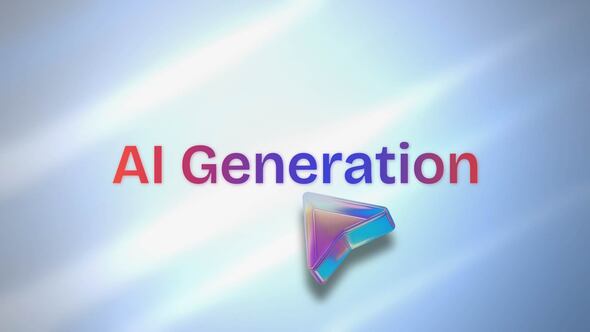
AI Generated Intro offers modern animations with smooth text reveals, perfect for tech presentations. Fully resizable with free updates and 24/7 support included.

Free Download AI Generated Intro. Experience AI Generated Intro, designed for seamless integration with Adobe Premiere Pro. Delivering clean, modern animations and smooth text reveals, it’s easy to customize and ideal for AI promos or SaaS presentations. Enjoy features like universal expressions, fully resizable options, and 24/7 support. Upgrade your projects with dynamic tech motion and free updates, making professional quality accessible for any creator.

Overview of AI Generated Intro

AI Generated Intro offers a clean, modern animation experience with smooth text reveals and dynamic tech motions, perfect for AI promos, apps, or SaaS. Easily customizable, it includes universal expressions, making it suitable for any language.

This tool provides fully resizable options and free fonts, along with in and out animations to enhance your presentations. Enjoy easy usability without any plugins. A video tutorial and 24/7 support ensure guidance, and you’ll receive all future updates free.

Available in 4K, it’s an excellent choice for contemporary presentations. For queries or project issues, you can reach out to [email protected].

Features of AI Generated Intro

  • Seamlessly integrates with Adobe Premiere Pro for smooth workflows.
  • Delivers clean, modern animations with smooth text reveals and dynamic tech motion.
  • Easy customization, perfect for AI promos, apps, and SaaS presentations.
  • Universal expressions work with any language, enhancing global usability.
  • Fully resizable to fit any project size or style.
  • Includes video tutorials for easy setup and guidance.
  • Features in and out animations to enhance visual flow.
  • Free fonts included, eliminating the need for additional purchases.
  • User-friendly and requires no plugins for operation.
  • Enjoy 24/7 support for any assistance needs.
  • All future updates are free, ensuring ongoing improvements.
  • Available in stunning 4K resolution to match modern display standards.

How to use AI Generated Intro

1. Open Adobe Premiere Pro and start a new project.

2. Import the AI Generated Intro template by dragging the downloaded files into your project panel.

3. Create a new sequence by right-clicking in the project panel and selecting New Item, then Sequence.

4. Drag the AI Generated Intro template into your timeline.

5. To customize text, double-click on the text layer in the timeline. Use the Essential Graphics panel to edit the content.

6. Adjust animations by selecting the animation layer and using the Effect Controls panel to tweak settings.

7. Resize the template by selecting it in the timeline and adjusting its scale in Effect Controls.

8. Preview your sequence to ensure everything looks correct.

9. Export your project by clicking File, then Export, and select your desired settings.

10. Save your final video and share it as needed.

Download More For Free :

  • Premiere Pro Templates
  • After Effects project
  • Apple Motion Templates
  • Graphics & Vector Art
  • Free Sound Effects
  • Plugin & Script

AI Generated Intro Demo and Download

To download the AI Generated Intro template from vfxdownload.net, visit the site and scroll down to the download section. Once there, click the download button to start the process. If prompted, follow any on-screen instructions to complete your download. Enjoy customizing your projects with this versatile tool.

https://s3.envato.com/h264-video-previews/80dd49ae-d104-48d4-b214-aca56181fea7/60797648.mp4

VideoHive – AI Generated Intro | Size: 19.8 MB

HOW TO DOWNLOAD INFORMATION

Premium Fast-Speed Links

Fast Prefiles  NitroFlare  Turbobit  RapidGator

Free Slow-Speed Links

File-Up  Usersdrive

Disclaimer

The AI Generated Intro template obtained from vfxdownload.net is intended for educational use only. For commercial use, you must purchase the template directly from VideoHive. Ensure compliance with all licensing terms to avoid any legal issues when using this content professionally.

Join @vfxdownloadnet on Telegram
Tags: ai editAI Generated IntroAI Generated Intro 60797648AI Generated Intro downloadAI Generated Intro for Adobe Premiere Proai promoAI-generatedanimation kitauto titlesbold typeclean motioncolor shiftcreative packeasy titlesedit toolfast presetFast Titlesflow motionfresh stylehighlight textinteractive interfacekinetic stylelight effectminimal packmodern lookmotionneon vibequick textsimple editsmart toolsmooth typesoft glowswipe texttext animationtrendy texttype effectVideohive AI Generated IntroVideohive AI Generated Intro 60797648Videohive AI Generated Intro 60797648 Free DownloadVideohive AI Generated Intro Free Download

Related Posts

VideoHive Vertical Christmas Logo 61099613
Premiere Pro Logo

VideoHive Vertical Christmas Logo 61099613

December 21, 2025
VideoHive Realistic Snow Particle Overlays – Cinematic Winter Drift FX Pack | PP 61067194
Adobe Premiere Pro

VideoHive Realistic Snow Particle Overlays – Cinematic Winter Drift FX Pack | PP 61067194

December 21, 2025
VideoHive Rapid Shutter Transitions 61071064
Adobe Premiere Pro

VideoHive Rapid Shutter Transitions 61071064

December 21, 2025
VideoHive Quotes 61061011
Premiere Pro Title

VideoHive Quotes 61061011

December 21, 2025
VideoHive Photo Slideshow Stream Of Memories 61066686
Adobe Premiere Pro

VideoHive Photo Slideshow Stream Of Memories 61066686

December 21, 2025
VideoHive Magic Holiday Sparkles Intro 61091567
Premiere Pro Title

VideoHive Magic Holiday Sparkles Intro 61091567

December 21, 2025

Categories

Subscribe VFX

Join Chat Group

VFX Request Bots

Most Popular Packs!!!

How To Download Files

Free Download!!!!!!


Facebook Telegram

Pages

  • Advertise
  • Contact Us
  • DMCA
  • How To Download
  • Privacy Policy
  • Search
  • VFXDownload.Net

Top Categories

  • After Effects
  • Adobe Premiere Pro
  • Free Course
  • Motion Graphics
  • Exclusive
  • Google Drive Courses/Packs
  • Plugin & Script

Copyright © 2020-2025 VFXDownload.Net

No Result
View All Result
  • After Effects
    • After Effects Project
    • Audio Spectrum
    • Title
    • Elements
    • Openers
    • Promo
    • Video Displays
    • Music Visualizer
    • Logo Opener/String/Intro
  • Premiere Pro
    • Premiere Pro Logo
    • MOGRT
    • Premiere Pro Project
    • Title
  • Graphics & Arts
  • Sounds
  • Courses
  • Plugins & Scripts

Copyright © 2020-2025 VFXDownload.Net