• Home
  • DMCA
  • Contact Us
  • Advertise
Subscribe On Telegram
Chat With Us
Request Anything
Wednesday, November 25, 2026
VFXDownload.Net
  • After Effects
    • After Effects Project
    • Audio Spectrum
    • Title
    • Elements
    • Openers
    • Promo
    • Video Displays
    • Music Visualizer
    • Logo Opener/String/Intro
  • Premiere Pro
    • Premiere Pro Logo
    • MOGRT
    • Premiere Pro Project
    • Title
  • Graphics & Arts
  • Sounds
  • Courses
  • Plugins & Scripts
No Result
View All Result
VFXDownload.Net
No Result
View All Result
Home After Effects Elements

VideoHive Cinematic Fog Overlays Pack – Realistic Mist & Atmospheric Film FX 60844695

December 1, 2025
in Elements, After Effects
0
VideoHive Cinematic Fog Overlays Pack – Realistic Mist & Atmospheric Film FX 60844695
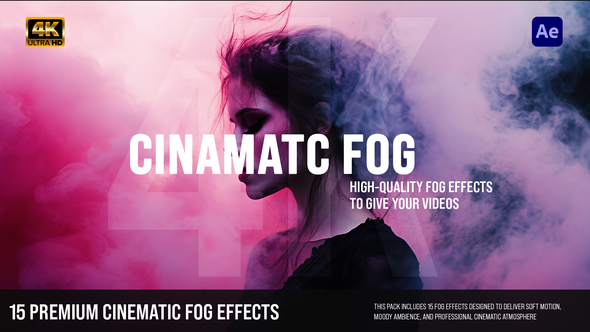
The ‘Cinematic Fog Overlays Pack’ offers realistic fog and atmospheric effects in 4K, enhancing visual storytelling with easy drag-and-drop use, no plugins needed.

Free Download Cinematic Fog Overlays Pack – Realistic Mist & Atmospheric Film FX. Create stunning visuals with the Cinematic Fog Overlays Pack, featuring realistic fog, mist, and haze effects to enhance your stories. Ideal for a range of projects like trailers and horror scenes, these atmospheric overlays add depth and mood. Delivered in 4K resolution, they ensure smooth integration with your After Effects workflow. Just drag and drop, pick your blend mode, and adjust opacity for a quick, professional touch—no plugins needed. Perfect for projects from VideoHive or other creative endeavors.

Overview of Cinematic Fog Overlays Pack – Realistic Mist & Atmospheric Film FX

The Cinematic Fog Overlays Pack adds dramatic and atmospheric depth to your visuals, offering 15 realistic fog, mist, and haze effects. Each overlay features smooth drifting fog, soft haze transitions, and subtle film movement, perfect for enhancing storytelling. Ideal for trailers, music videos, horror scenes, and more, these overlays blend seamlessly with any footage. Delivered in 4K resolution, they require no plugins. Simply drag and drop, choose your blend mode, and adjust opacity for the desired effect.

Features of Cinematic Fog Overlays Pack – Realistic Mist & Atmospheric Film FX

  • 15 Realistic Fog Overlays: Enhance your visuals with cinematic depth and emotion.
  • Soft, Atmospheric Transitions: Achieve smooth fog movements for a film-inspired look.
  • 4K Resolution Ready: Experience high-quality overlays for pristine visuals.
  • Drag & Drop Integration: Easily add effects directly into After Effects.
  • Blend Mode Ready: Choose from Screen, Add, or Lighten to tailor the mood.
  • No Plugins Needed: Streamline your workflow without additional software.
  • Ideal for Diverse Projects: Perfect for trailers, horror scenes, and social media edits.
  • Seamless Software Compatibility: Works with all major video editing applications.

How to use Cinematic Fog Overlays Pack – Realistic Mist & Atmospheric Film FX

1. Open After Effects and import your footage and the fog overlays into your project panel.

2. Drag your footage onto the timeline.

3. Place a fog overlay above your footage layer in the timeline.

4. Select the overlay layer, then access the blending mode dropdown menu.

5. Choose a blend mode like Screen, Add, or Lighten to integrate the fog with your scene.

6. Adjust the opacity of the overlay layer to achieve your desired intensity.

7. For further customization, use the Transform controls (position, scale) to adjust the fog’s placement and size.

8. Preview your composition by pressing the spacebar, ensuring the fog enhances your visual.

9. Once satisfied, render your project using your preferred settings.

Remember, these overlays work seamlessly without plugins, making them easy to integrate into any creative project.

Download More For Free :

  • Premiere Pro Templates
  • After Effects project
  • Apple Motion Templates
  • Graphics & Vector Art
  • Free Sound Effects
  • Plugin & Script

Cinematic Fog Overlays Pack – Realistic Mist & Atmospheric Film FX Demo and Download

To download the Cinematic Fog Overlays Pack, visit vfxdownload.net and scroll to the download section. Click the download button to obtain the template instantly. Make sure you have enough storage and check for any compatibility requirements with your editing software. Enjoy adding stunning fog and atmospheric effects to your projects effortlessly.

https://s3.envato.com/h264-video-previews/9edfc96c-9066-4e81-84a8-180f52c6c6e9/60844695.mp4

VideoHive – Cinematic Fog Overlays Pack – Realistic Mist & Atmospheric Film FX | Size: 532.5 MB

HOW TO DOWNLOAD INFORMATION

Premium Fast-Speed Links

Fast Prefiles  NitroFlare  Turbobit  RapidGator

Free Slow-Speed Links

File-Up  Usersdrive

Disclaimer

Disclaimer: The Cinematic Fog Overlays Pack provided by vfxdownload.net is for educational purposes only. For commercial use, you must purchase the pack directly from VideoHive. Ensure compliance with all licensing agreements.

Join @vfxdownloadnet on Telegram
Tags: 4kAbstractAmbientatmosphereAtmosphericFXbackgroundCinematicCinematic Fog Overlays Pack – Realistic Mist & Atmospheric Film FXCinematic Fog Overlays Pack – Realistic Mist & Atmospheric Film FX 60844695Cinematic Fog Overlays Pack – Realistic Mist & Atmospheric Film FX downloadCinematic Fog Overlays Pack – Realistic Mist & Atmospheric Film FX for After EffectscinematicfxcinematiclookcloudCreativedarkdramaticdramaticfxdreamyeditingElegantFilmfilmlookfogfogfxGlowhazehazeFXhdhorrormediamistmoodymoodyfxmotionmysteryoverlayfxoverlaypackoverlaysPackparticlesSmokesmokefxSmoothsoftsoftfogStylishtexturethrillervaporVideohive Cinematic Fog Overlays Pack – Realistic Mist & Atmospheric Film FXVideohive Cinematic Fog Overlays Pack – Realistic Mist & Atmospheric Film FX 60844695Videohive Cinematic Fog Overlays Pack – Realistic Mist & Atmospheric Film FX 60844695 Free DownloadVideohive Cinematic Fog Overlays Pack – Realistic Mist & Atmospheric Film FX Free DownloadVisualvisualfx

Related Posts

VideoHive Mosaic Photo Reveal | Corporate Logo 62136882
After Effects

VideoHive Mosaic Photo Reveal | Corporate Logo 62136882

November 24, 2026
VideoHive Micro Glitch Logo 62310987
After Effects

VideoHive Micro Glitch Logo 62310987

November 24, 2026
VideoHive Future Fitness Opener V2.2 22111461
After Effects

VideoHive Future Fitness Opener V2.2 22111461

November 24, 2026
VideoHive Dynamic Multi Screen Intro | Vertical & Horizontal Promo Opener 62090791
After Effects

VideoHive Dynamic Multi Screen Intro | Vertical & Horizontal Promo Opener 62090791

November 24, 2026
VideoHive Brush Stroke Logo Reveal 62127151
After Effects

VideoHive Brush Stroke Logo Reveal 62127151

November 24, 2026
VideoHive Thermal Logo Reveal 62090289
After Effects

VideoHive Thermal Logo Reveal 62090289

November 23, 2026
0 0 votes
Article Rating
Subscribe
Notify of

This site uses Akismet to reduce spam. Learn how your comment data is processed.

0 Comments
Oldest
Newest Most Voted

Categories

Subscribe VFX

Join Chat Group

VFX Request Bots

Most Popular Packs!!!

How To Download Files

Free Download!!!!!!


Facebook Telegram

Pages

  • Advertise
  • Contact Us
  • DMCA
  • How To Download
  • Privacy Policy
  • Search
  • VFXDownload.Net

Top Categories

  • After Effects
  • Adobe Premiere Pro
  • Free Course
  • Motion Graphics
  • Exclusive
  • Google Drive Courses/Packs
  • Plugin & Script

Copyright © 2020-2025 VFXDownload.Net

No Result
View All Result
  • After Effects
    • After Effects Project
    • Audio Spectrum
    • Title
    • Elements
    • Openers
    • Promo
    • Video Displays
    • Music Visualizer
    • Logo Opener/String/Intro
  • Premiere Pro
    • Premiere Pro Logo
    • MOGRT
    • Premiere Pro Project
    • Title
  • Graphics & Arts
  • Sounds
  • Courses
  • Plugins & Scripts

Copyright © 2020-2025 VFXDownload.Net

wpDiscuz
0
0
Would love your thoughts, please comment.x
()
x
| Reply