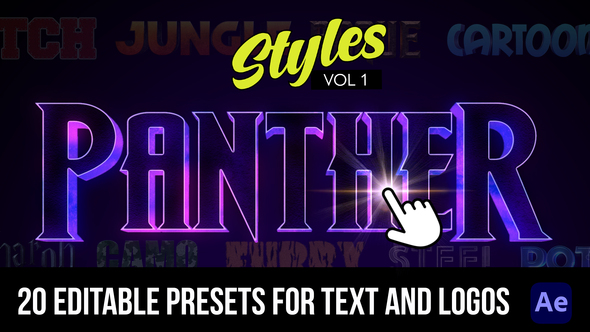


Free Download AE Cinematic Styles. Are you ready to take your Adobe After Effects projects to the next level? Experience the magic of AE Cinematic Styles with 20 unique styles perfect for creating stunning cinematic intros. From textures like Rock and Fur to the sleek appeal of Chrome and Steel, these presets provide a range of visuals without needing any plugins. Each style is easily adjustable in the essentials graphics panel, ensuring your text not only looks 2D but also pops with a 3D effect. An instructional video is also included to guide you smoothly through the process!
Overview of AE Cinematic Styles
If you’re looking to give your video projects a truly cinematic edge, the AE Cinematic Styles pack offers a selection of 20 unique styles for creating stunning intros in Adobe After Effects, without the need for additional plug-ins. This pack includes a variety of textures such as Rock, Fur, Cloth, Chrome, and Steel, alongside specialty styles like Potion, Varsity Style Stitch, and Super Hero themes. Each preset is adjustable through the essentials graphics panel, providing both ease and flexibility. All styles are designed to give a 3D look and feel while remaining in 2D format, ensuring compatibility and ease of use. An instructional video is also included to help you get started immediately.
Features of AE Cinematic Styles
If you’re diving into your next project in Adobe After Effects and aiming to add that captivating cinematic flair, AE Cinematic Styles is a perfect toolkit. These presets require no additional plug-ins and offer a wide variety of styles, making your intros stand out with minimal effort. Below are the key features you can expect:
- Rock: Gives a rugged, earthy feel to your text.
- Fur: Adds a soft, tactile texture, perfect for more whimsical themes.
- Cloth: Simulates a fabric appearance, adding softness and a touch of realism.
- Chrome: For that sleek, ultra-modern metallic finish.
- Steel: Imparts a strong, resilient quality.
- Potion: Introduces an enchanting, mystical effect.
- Varsity Style Stitch: Ideal for themes revolving around sports or collegiate events.
- Cartoon looks: Transforms text into fun, animated styles.
- Super Hero: Tailored to add an impactful, bold aesthetic suited for heroic themes.
- Adjustable Presets: All styles are customizable through the essential graphics panel.
- 3D Look: Each 2D text style is designed to pop with a three-dimensional appearance.
- Instructional Video: Includes a guide to help you easily apply and adjust these styles.
These styles integrate seamlessly with After Effects, enhancing your workflow, and ensuring you can apply high-quality cinematic visuals to your animations efficiently. Whether you’re working on a small project or a large production, AE Cinematic Styles provide the tools you need to bring your creative vision to life.
How to use AE Cinematic Styles
If you’re ready to start using the AE Cinematic Styles template in After Effects, follow these simple steps for a successful project:
1. Open After Effects and create a new project. Navigate to the ‘File’ menu, select ‘Import’, then ‘File…’ and choose your AE Cinematic Styles template file.
2. Once the template is loaded into your project panel, drag and drop the template composition into the timeline. This action sets up your editing workspace with the cinematic styles.
3. Inside the composition, you’ll find various layers pre-configured with effects. Click on each layer to view and edit the properties. You can adjust settings like opacity, color, and transitions to suit your video content.
4. To add your footage, find a placeholder marked typically as ‘Replace with your footage’ or a similar indicator. Right-click on this, select ‘Replace Footage’, and then ‘File…’ to insert your video clips.
5. After adding all your footage and making the desired style adjustments, click on ‘Composition’ followed by ‘Add to Render Queue’. Adjust your output settings and hit ‘Render’ to finalize your cinematic video.
This step-by-step method ensures you effectively use the AE Cinematic Styles template to produce a visually striking video tailored to your creative needs. Enjoy crafting your cinematic masterpiece!
Download More For Free :
AE Cinematic Styles Demo and Download
If you’re eager to add drama and style to your video projects, the ‘AE Cinematic Styles’ template is a perfect choice. For a quick and easy download, visit vfxdownload.net. Once there, simply scroll to the download section positioned at the page’s bottom or as indicated by the website. Click the vibrant download button, and you’ll be set to start incorporating these dynamic styles into your projects. This process is designed to be straightforward, ensuring you get to your creative work without delay.
VideoHive – AE Cinematic Styles | Size: 225.77 MB
Fast Prefiles NitroFlare Turbobit RapidGator
Disclaimer
If you are considering using the ‘AE Cinematic Styles’ template by ‘VideoHive’, please note that the demo content is strictly for educational purposes only. For any commercial usage, you must obtain the full version from ‘vfxdownload.net’. This ensures you comply with the licensing requirements and support the creators of the template.