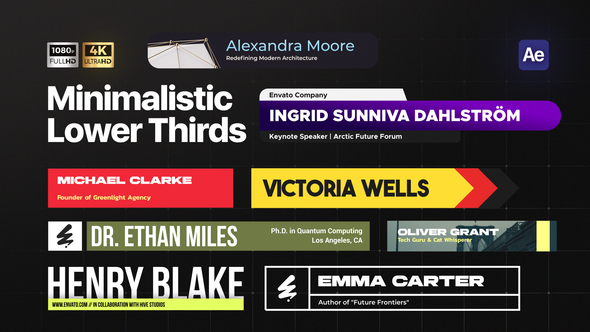



Free Download Lower Thirds. Looking to give your video projects a sleek, professional look? Consider using the Clean & Minimal Lower Thirds template for After Effects. This easy-to-use template provides eight unique lower third animations that are perfect for everything from corporate videos to YouTube content and interviews. The animations are subtle, yet effective, enhancing your content without overpowering it. With full customization available through the Essential Properties panel and no plugins required, these lower thirds offer both simplicity and style, ensuring your projects look top-tier every time.
Overview of Lower Thirds
Discover the elegance of minimalistic design with the Clean & Minimal Lower Thirds After Effects template. Ideal for video creators looking to infuse a touch of simplicity and professionalism into their projects, this template offers eight unique lower third animations. They are not only smooth and subtle but are fully customizable and compatible with both Full HD and 4K resolutions. Perfect for podcasts, vlogs, and corporate videos, this template simplifies customization through the Essential Properties panel, allowing for easy adjustments of colors, fonts, and animation durations. With comprehensive video tutorials included and no plugins required, achieving professional results has never been more straightforward.
Features of Lower Thirds
- No plugins necessary: This template is ready to use without any additional installations, streamlining your editing process.
- Compatible with After Effects 2024 and above: Ensures you are working with up-to-date software, enhancing your editing capability.
- Supports Full HD and 4K resolutions: Whether you are working on high-definition or ultra-high-definition projects, this template adapts smoothly.
- Eight unique minimalistic animations: Provides a variety of choices, making it versatile for different types of video content.
- Customizable duration: Adjust the timing of the animations to fit the specific needs of your project, offering flexibility in the editing process.
- Fully customizable via the Essential Properties panel: Effortlessly modify colors, fonts, icons, and more to match your style.
- Smooth and subtle animations: These enhance your text visibility without overpowering the visuals, maintaining a professional look.
- Includes video tutorial and help file: Guidance is readily available, making it easy for users of all experience levels to utilize the template effectively.
- Ideal for various content types: Perfect for enhancing podcasts, vlogs, interviews, and corporate videos with a refined touch.
Each feature of the ‘Lower Thirds’ is seamlessly integrated into After Effects, making it convenient for creators to apply and customize lower-third graphics directly within their projects. This deep integration ensures a fluid workflow and professional results with minimal effort. This tool is an excellent choice for both novice and seasoned video creators looking to elevate their visual storytelling.
How to use Lower Thirds
If you’re ready to begin using the ‘Lower Thirds’ template in After Effects, follow these straightforward steps for a smooth experience.
1. Start by opening After Effects and go to File > Open Project to select your ‘Lower Thirds’ template file.
2. Once loaded, locate the Essential Graphics Panel; if not visible, find it under Window > Essential Graphics to activate it.
3. Inside the Essential Graphics Panel, you’ll see various editable fields like text, color, and logo. Click on the text field to update with your desired text.
4. To change text properties such as font size or color, use the Character and Paragraph Panels for adjustments.
5. If you want to add a logo, drag and drop your file into the logo placeholder, adjusting its size and position as needed.
6. After customizing, preview your lower third by pressing the spacebar for a quick playthrough. Make any final tweaks to ensure everything looks perfect.
7. Finally, render your project by going to File > Export > Add to Render Queue. Adjust settings as needed and click Render to complete.
By following these steps, you’ll create professional-looking lower thirds that can enhance your video projects effectively.
Download More For Free :
Lower Thirds Demo and Download
If you’re looking to enhance your video projects with professional-looking graphics, downloading the ‘Lower Thirds’ template from vfxdownload.net is a simple process. First, head over to the website and navigate to the ‘Lower Thirds’ template page. Once there, you’ll find the download section prominently displayed. Simply click on the download button to start your download. This user-friendly template is an excellent choice for adding a sleek, modern touch to your videos with minimal effort.
VideoHive – Lower Thirds | Size: 112.18 MB
Fast Prefiles NitroFlare Turbobit RapidGator
Disclaimer
If you’re a video editor looking to enhance the visual appeal and professionalism of your projects, consider using the ‘Lower Thirds’ template by VideoHive. Ideal for adding polished titles and essential graphics, this template is available for educational use through a demo provided by vfxdownload.net. For any commercial application, you must purchase the full version directly from vfxdownload.net. This ensures that creators are fairly compensated for their work while you enjoy high-quality, professional graphics in your editing projects.