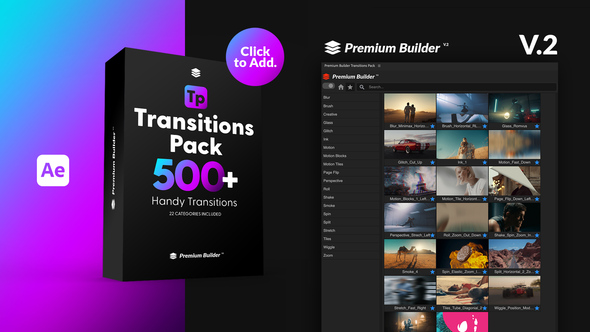



Free Download Transitions Pack. Looking to elevate your video projects effortlessly? The Transitions Pack V2 for After Effects is your go-to solution, featuring over 500 handy transitions across 22 diverse categories. Ideal for AE CC 2019 and above, this package comes with the intuitive PremiumBuilder Extension Tool, making customization a breeze—no plugins required. Whether you’re adjusting to 8K or mobile resolution, enhancing your logo displays, or needing a quick live preview, this tool handles it all with ease and creativity. Perfect for any video editor’s toolkit, it ensures your transitions are smooth and striking.
Overview of Transitions Pack
The Transitions Pack V2 for After Effects is an all-encompassing toolkit designed to make video editing seamless and dynamic. With over 500 handy transitions in 22 diverse categories, this package enhances any project, be it 8K or mobile resolution, by allowing flexibility with customizable duration and speed. Notably, it includes the PremiumBuilder Extension, elevating user experience by offering features like a home button, minimization and categorization, alongside a built-in search function, making it user-friendly. This tool requires no additional plugins and comes with a helpful tutorial, ensuring that even those new to After Effects can jump right in with ease. Perfect for creative endeavors, the pack includes unique categories such as Glass, Glitch, Ink, and newly added Scale Radial Lens and Scale Wipe transitions.
Features of Transitions Pack
If you’re looking to elevate your video projects with dynamic transitions, the ‘Transitions Pack V2’ for After Effects provides an extensive range of options that can bring your edits to life. This tool is especially compatible with AE CC 2019 and above, ensuring a smooth integration for users of recent versions of After Effects. Here’s a closer look at the key features of the ‘Transitions Pack’:
- **Over 500 Handy Transitions**: A vast library of transitions across 22 different categories, making it easy to find the perfect fit for any project.
- **PremiumBuilder Extension Included**: Enhances workflow with efficient tools like Home Button, Minimize/Maximize, and an easy-to-navigate side menu.
- **Highly Customizable**: Adjust duration, speed, and composition size up to 8K for tailored visual effects. Plus, creative categories feature logo placeholders.
- **Versatile Usage**: Compatible with numerous project formats (8K, 4K, HD, Mobile, Square) to meet diverse production needs.
- **No Plugins Required**: Ready to use right out of the box without the need for additional plugins, simplifying your editing process.
- **Live Preview & Easy Customization**: Preview changes in real-time and tweak settings with ease to achieve desired results.
- **Universaliser Controller**: Makes the pack compatible with any language, broadening its accessibility.
- **Detailed Tutorial Included**: Comes with a voice-over tutorial, aiding users through setup and customization steps.
- **New Features**: Includes innovative transitions like Scale Radial Lens and Scale Wipe to keep your edits fresh and engaging.
The integration with After Effects ensures that you can leverage these transitions seamlessly within your existing projects, enhancing visual storytelling without compromising on performance. Whether you’re working on a personal project or commercial content, the ‘Transitions Pack V2’ offers both novelty and functionality to boost your creative output.
How to use Transitions Pack
If you’re ready to add dynamic flair to your After Effects projects using the Transitions Pack template, here’s a simple guide to get you started:
1. Open After Effects and import your video clips by navigating to File > Import > File.
2. Drag your imported clips onto the timeline to create a new composition.
3. Locate the Transitions Pack template file. Import it into After Effects the same way you imported your video clips.
4. Open the Transitions Pack composition. You will see various transitions you can use.
5. Decide where you want to add a transition in your main composition timeline. Typically, this would be at the point where one clip ends and another begins.
6. Drag and drop the chosen transition from the Transitions Pack comp to the designated place on your main comp timeline.
7. Adjust the duration of the transition by dragging its edges until it aligns perfectly with the switch between clips. Ensure the transition’s impact aligns with your clip change for a seamless effect.
8. Preview your video by hitting the space bar to ensure the transition looks as expected. Make adjustments as needed.
9. Once satisfied, add other transitions as required following the same steps.
These steps will help you enhance your videos effectively using the Transitions Pack in After Effects, giving your edits a professional polish.
Download More For Free :
Transitions Pack Demo and Download
Are you eager to elevate your video projects with dynamic transitions? Visit vfxdownload.net to get your hands on the latest Transitions Pack. It’s a simple process: scroll down until you reach the download section and then just click the download button. Enjoy a wealth of creative options that will bring your edits to life, seamlessly blending scenes with professional flair. Get your Transitions Pack today and transform your video content into a visually stunning narrative.
VideoHive – Transitions Pack | Size: 1.81 GB
Fast Prefiles NitroFlare Turbobit RapidGator
Disclaimer
When considering enhancing your video projects, the Transitions Pack by VideoHive offers a variety of dynamic effects suitable for various editing needs. This template is available for educational use; however, if you intend to use them commercially, please ensure to acquire them through a purchase from vfxdownload.net. This ensures that all creators receive appropriate compensation and recognition for their work, supporting the continued development of high-quality resources.