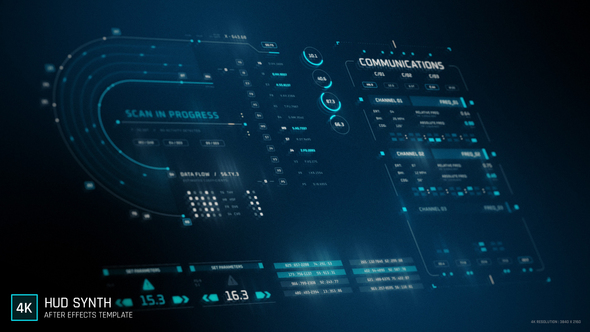
Free Download HUD – Synth. Are you seeking to create visually captivating, futuristic interfaces for your projects using After Effects? Look no further than the HUD – Synth template, a comprehensive toolkit featuring over 67 animated HUD elements. Ideal for adding high-tech flair to your videos, this template allows you to customize a variety of full-screen HUDs and data blocks effortlessly. Enjoy features like 4K resolution, easy color customization, and a helpful video tutorial to streamline your design process. Perfect for projects needing a sci-fi or cyberpunk touch, all without the need for additional plugins.
Overview of HUD – Synth
HUD – Synth is an After Effects template that includes over 67 dynamic HUD elements. Perfect for crafting futuristic interfaces, the package offers a diverse collection of data blocks and screen-wide displays, which are fully customizable in terms of color. It supports 4K resolution and runs smoothly at 24 fps without the need for plugins. With each element having a 10-second duration and universal expressions enhancing compatibility, this template remains user-friendly with an included video tutorial and uses the free Oxanium font. Ideal for projects aiming for a high-tech or cyberpunk aesthetic.
Features of HUD – Synth
If you’re venturing into the world of video editing and effects, the ‘HUD – Synth’ After Effects template might just be what you need to spice up your projects. This template is packed with dynamic features that make it a top pick for creators looking to add a futuristic touch to their work. Notably, it integrates seamlessly with After Effects, ensuring you can add complex HUD elements to your projects without a hitch. Here’s a breakdown of what ‘HUD – Synth’ offers:
- High Resolution: Supports 4K – 3840×2160p, making it suitable for high-quality video projects.
- Frame Rate: Smooth playback with 24 frames per second.
- Color Customization: Easily adjust colors to fit the theme of your video or personal preferences.
- Universal Expressions: Use any version of After Effects without compatibility issues.
- Animation Duration: Each animation lasts 10 seconds, ideal for quick yet impactful visuals.
- Plugin-Free: No additional plugins are required to use this template.
- Included Tutorial: Comes with a video tutorial to help you get started quickly and efficiently.
- Complementary Elements: Features 67+ animated HUD elements, including data blocks and full-screen HUDs.
- Font and Sound: Utilizes the free Oxanium font. Note that music used in the preview is not included.
Integration with After Effects means that ‘HUD – Synth’ is not only easy to use but also highly effective in executing high-tech visual tasks. Whether you are compiling a sci-fi scene or need to display futuristic data overlays, this template offers high performance, versatility, and eye-catching aesthetics. Simply put, it turns complex visual tasks into a streamlined workflow in After Effects.
How to use HUD – Synth
Using the ‘HUD – Synth’ Template in After Effects
1. Open Adobe After Effects. Select ‘File’ from the menu, then ‘Open Project’ to load your project where you want to apply the ‘HUD – Synth’ template.
2. Navigate to the ‘Essential Graphics’ panel. If it’s not visible, go to ‘Window’ and click on ‘Essential Graphics’ to activate the panel.
3. In the ‘Essential Graphics’ panel, click on the ‘Browse’ tab. Type ‘HUD – Synth’ in the search bar to find the template.
4. Drag and drop the ‘HUD – Synth’ template onto your composition timeline where you want the graphic to appear.
5. Customize the template by selecting it in the timeline. Adjust settings like color, size, and text in the ‘Effect Controls’ panel to fit your project’s needs.
6. Preview your adjustments by hitting the ‘Spacebar’ to play the section. Make further edits as needed to ensure it blends well with your video.
7. Save your project by clicking ‘File’ followed by ‘Save’ to keep all changes.
This straightforward approach will help you effectively integrate the ‘HUD – Synth’ template into your project, creating a professional-looking effect.
Download More For Free :
HUD – Synth Demo and Download
If you’re eager to bring a futuristic touch to your video projects, grabbing the ‘HUD – Synth’ template from vfxdownload.net is a brilliant move. Here’s how to get it:
1. Visit the website at vfxdownload.net.
2. Navigate to the search bar and type “HUD – Synth” to find the template quickly.
3. Once on the template page, scroll down until you see the download button.
4. Click on the download button and follow any additional instructions to complete the download process.
This quick guide will help you access a dynamic tool that can significantly improve your video projects with its high-quality effects. Happy editing!
VideoHive – HUD – Synth | Size: 102.06 MB
Fast Prefiles NitroFlare Turbobit RapidGator
Disclaimer
If you’re exploring the creative possibilities of video editing, the ‘HUD – Synth’ template from VideoHive can be an invaluable resource. This template is available for educational purposes to enhance your learning experience in video production. To use this template for any commercial projects, please ensure to acquire it directly from vfxdownload.net. This step is essential to comply with the legal standards and support the creators.