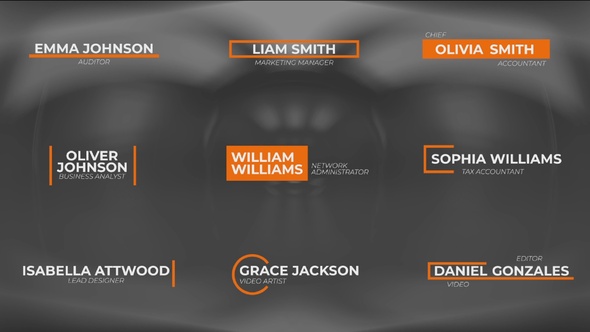

Free Download Lower Thirds Animation in Davinci Resolve. Creating compelling lower thirds in your videos can set a professional tone and enhance viewer engagement. With the “Lower Thirds Animation in Davinci Resolve” template, designed specifically for DaVinci Resolve 18, achieving high-quality, customizable animations has never been simpler. This user-friendly template allows creators to seamlessly integrate animated titles directly into their projects, elevating their production value with minimal effort.
This template package boasts nine beautifully animated titles, all in stunning 4K resolution, ensuring clarity and impact. Designed for ease, it requires no additional plugins and offers a drag-and-drop feature that simplifies the editing process immensely. Users can effortlessly modify text and colors, providing ultimate creative control to fit any brand or style. Ideal for enhancing commercials, corporate presentations, or social media videos, this tool helps you convey professionalism and attention to detail in every frame.
Overview of Lower Thirds Animation in Davinci Resolve
Elevate your video projects with the Lower Thirds Animation template for DaVinci Resolve 18. This resource packs nine customizable animated titles in sharp 4K resolution, designed to make your edits sleek and professional. With features allowing for full color and scale control, adjustments are simple – drag and drop to modify texts and colors. Perfect for enhancing adverts, commercials, promotions, and corporate presentations, this template operates smoothly without any additional plugins, facilitating a user-friendly experience that’s ideal for both new and seasoned editors alike.
Features of Lower Thirds Animation in Davinci Resolve
- Requires DaVinci Resolve 18: Specifically formatted for compatibility with DaVinci Resolve 18, ensuring a seamless user experience.
- High Resolution: Supports 4K resolution (3840×2160), providing sharp and clear graphics for professional use.
- Editable Elements: Offers full customization options including text, colors, and scales directly within Davinci Resolve for a personalized touch.
- Drag and Drop Simplicity: Designed for easy use; simply drag the template into your project timeline, edit as necessary, and you’re set to render.
- Text and Image Placeholders: Structured to allow quick replacements of text and images, facilitating efficient workflow adjustments.
- No Additional Plugins Required: Works natively within Davinci Resolve without the need for extra plugins, streamlining the editing process.
- Nine Animated Titles: Includes a variety of nine dynamic titles, each able to be customized to fit different themes and styles.
- Optimized for Advertisements and Presentations: Perfect for enhancing commercials, promotions, corporate presentations, and social media videos like those on Facebook and YouTube.
The ‘Lower Thirds Animation in Davinci Resolve’ integrates smoothly with DaVinci Resolve, enabling users to utilize these tools within the familiar environment of DaVinci software. This integration helps maintain workflow efficiency and optimizes the creative process by allowing modifications directly within the project timeline. Designed for professionals and enthusiasts alike, this tool enhances video projects effectively and effortlessly.
How to use Lower Thirds Animation in Davinci Resolve
If you’ve chosen the ‘Lower Thirds Animation in DaVinci Resolve’ template to add a professional touch to your videos, here are the essential steps you need to follow:
1. Open DaVinci Resolve and create a new project. Import the video file you want to enhance by navigating to the ‘Media’ tab and then dragging your file into the media pool.
2. Switch to the ‘Edit’ tab. From here, drag your video file onto the timeline.
3. Now, browse the ‘Effects Library’ where you’ll find the ‘Lower Thirds Animation’ template under ‘Titles’. Drag this template above the video track on the timeline where you want the animation to appear.
4. To customize the text and colors, click on the template in the timeline. Then adjust the settings in the ‘Inspector’ panel to match your branding or style preferences.
5. After finalizing your adjustments, preview the animation by hitting the spacebar. If satisfied, move to the ‘Deliver’ tab, adjust export settings, and hit ‘Render’.
By following these steps, you can integrate dynamic lower thirds into your videos using DaVinci Resolve efficiently. Happy editing!
Download More For Free :
Lower Thirds Animation in Davinci Resolve Demo and Download
To download the ‘Lower Thirds Animation in Davinci Resolve’ template, simply visit vfxdownload.net. Once there, navigate to the specific page of the template. Look for the download section towards the bottom part of the page and click the download button. The file should start downloading immediately, allowing you to enjoy enhancing your video projects with professional graphics. Make sure to check the specifications and compatibility with your version of Davinci Resolve to ensure optimal performance.
VideoHive – Lower Thirds Animation in Davinci Resolve | Size: 38.8 MB
Fast Prefiles NitroFlare Turbobit RapidGator
Disclaimer
If you’re interested in enhancing your video projects with professional lower thirds, consider the ‘Lower Thirds Animation in Davinci Resolve’ template available at VideoHive. This template allows users to add sleek, clean, and modern title animations to their videos which could significantly improve their presentation quality. Please note, the content provided in the demo is intended solely for educational use. For any commercial applications, you are required to make a purchase from vfxdownload.net. This ensures that all creators involved receive proper compensation and recognition for their work. This disclaimer aims to provide clear guidelines on the usage of the ‘Lower Thirds Animation in Davinci Resolve’ template, ensuring ethical and legal use of digital content.